<img height="1" width="1" style="display:none" src="https://www.facebook.com/tr?id={244756505703335}&amp;ev=PageView&amp;noscript=1">

The Buffer alternative that doesn’t charge per profile.
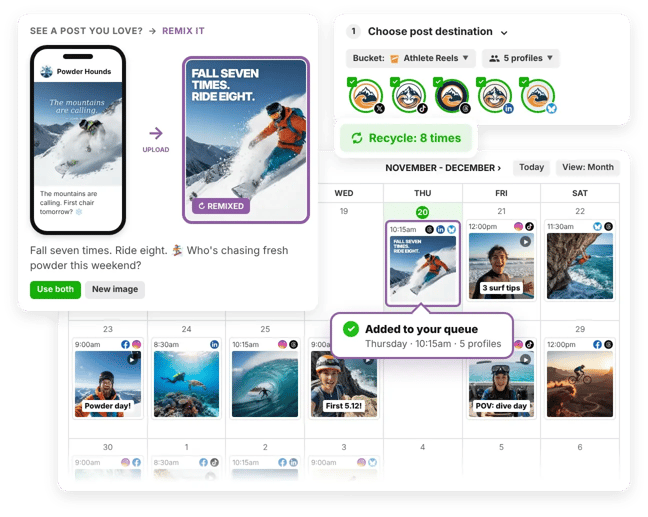
Post Planner composer: choose a bucket and profiles, remix a screenshot of a post into a new image and caption, and add it to the queue for Thursday on the calendar

Schedule posts to 10 networks

Facebook
Instagram
threads
google-business-profile
LinkedIn
Pinterest
TikTok
Twitter/X
youtube
bluesky

Get content from top sources

Facebook pages
Linkedin pages
Reddit subreddits
YouTube videos
Google articles
Giphy gifs
RSS feeds
Unsplash stock media
openai1
Bluesky

Post Planner vs Buffer, side by side

Buffer's bill goes up with every profile you add. Post Planner gives you a bundle of profiles for one affordable, flat price (add-ons available). Set your numbers to see both prices.

Social profiles15

1102550

Users

Billing

Post Planner Growth15 profiles, 2 users
$39/mo$468 a year
Buffer Essentials1 user only
$66.67/mo$800 a year
Buffer Teamunlimited users
$116.67/mo$1,400 a year

That's $932 a year less than Buffer Team for 15 profiles and 2 users.

Post Planner Growth

  • 15 profiles and 2 users in one price
  • Finds top posts in your niche, rated 1 to 5 stars
  • Recycles your best posts, on every plan
  • AI images built into the composer, plus unlimited AI captions
  • Bulk upload from a spreadsheet, RSS feed, media uploads or a content stream

Buffer Team

  • Billed for each profile you connect
  • Community inbox for comments
  • No performance-rated posts
  • Bulk upload takes text and single-image posts only
  • No built-in AI image generator
FeaturePost PlannerBuffer
Free plan1 profile, 30 scheduled posts at a time3 profiles, 10 scheduled posts per profile
Networks10: Facebook, Instagram, LinkedIn, Pinterest, TikTok, X, YouTube, Threads, Bluesky and Google Business12, including Mastodon and Substack
Find top posts in your nicheTop posts from Facebook pages, Bluesky, Reddit and RSS, rated 1 to 5 stars by performanceRSS feeds and Threads trending topics, with no performance ratings
Bulk uploadFrom a spreadsheet, an RSS feed, media uploads or a content streamFrom a CSV file, text and single-image posts only
Post recyclingOn every planRecurring posts, still in beta. You set a repeat count on each post
AI writingUnlimited on every planUnlimited AI Assistant
AI imagesBuilt into the composer, on every planNo built-in generator
Users1 to 10, included in the plan price (add-ons available)1 on Essentials, unlimited on Team

Buffer prices and features checked on buffer.com, November 24, 2026.

Why people switch

Switch to Post Planner if

  • You're tired of guessing what to post.Content streams pull top posts from Facebook pages, Bluesky, Reddit and RSS, each rated 1 to 5 stars by how well it performed.
  • You manage 10 or more profiles.On Buffer Team, 10 profiles cost $100 a month, billed yearly. Post Planner Growth covers up to 15 profiles and 2 users for $39 a month, billed yearly.
  • You want your best posts to run again.Recycling is on every plan, including Free.
  • You want AI images as well as captions.AI images are built into the composer on every plan, with unlimited AI captions.

Stay on Buffer if

  • You want 3 profiles for free.Buffer's Free plan covers 3 profiles with 10 scheduled posts each. Ours covers 1 profile with 30 scheduled posts.
  • You post to Mastodon or Substack.Buffer connects to both. Post Planner doesn't.
  • You reply to comments from one inbox.Buffer's Community inbox handles comments across your profiles. Post Planner doesn't have an inbox.
  • You need detailed reports.Buffer Essentials exports analytics as CSV, PDF or markdown. Post Planner's analytics are simpler.

FIND

Find posts proven to go viral in YOUR niche

Content streams pull top-performing posts from the sources you pick (Facebook pages, Bluesky, Reddit, RSS and more), each rated 1 to 5 stars. Search any keyword to see what's trending across the web.

Your next week of posts is a scroll, not a brainstorm.
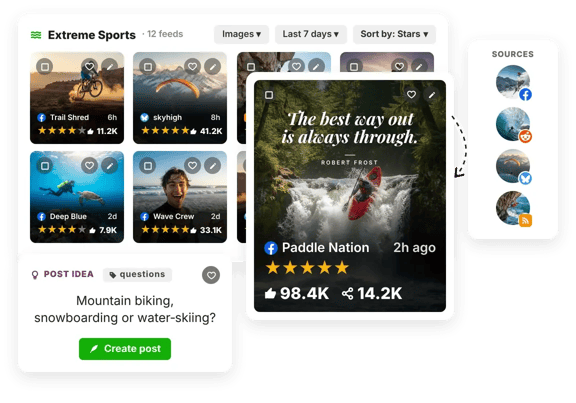
Content stream sorted by star ratings with a 5-star post and a post idea
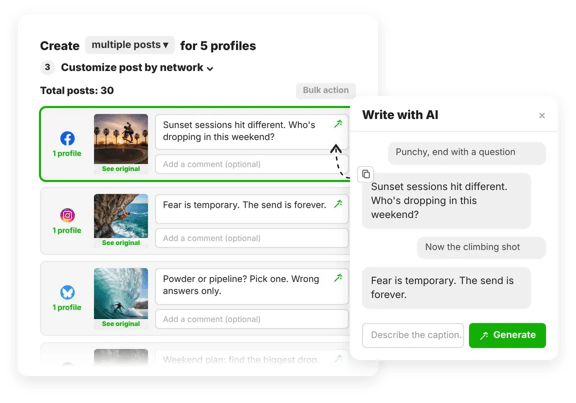
Creating 30 posts at once with AI-written captions

CREATE

Create winning posts for a whole month

See a post you love? Remix it — upload a screenshot, and AI turns the idea into a new, original image and caption for your brand. Starting from scratch instead? AI writes unlimited captions on every plan and generates images right in the composer. Need volume? Bulk-create dozens at once from a spreadsheet, your media, or an RSS feed.

A post takes clicks. A month takes one sitting.

AUTOMATE

Schedule once. Post everywhere, automatically

Set your schedule once. Post across all 10 networks, recycle your best posts, and keep your feeds active while you run your business.
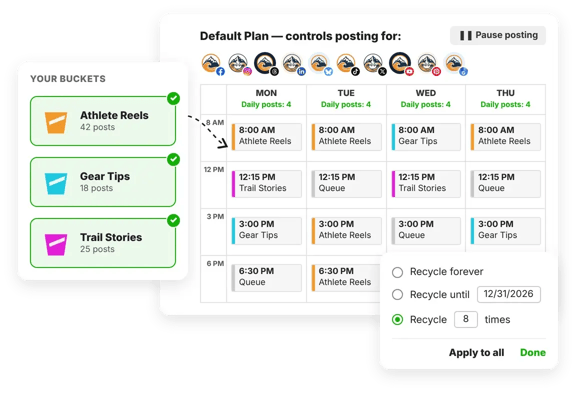
Weekly posting plan filled from buckets with recycling set
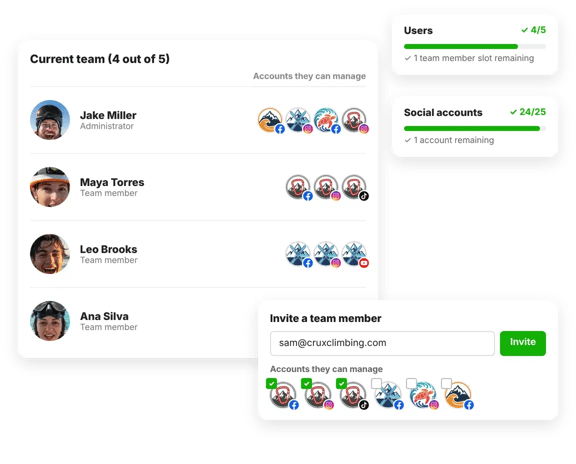
Team members with their own seats and brand accounts

FOR MULTI-BRAND MANAGERS

One login. Manage every brand and client

Connect every profile under one account, group them by brand or client with buckets, and give teammates their own seats. Plans scale from a couple of profiles to a full agency roster.

From people who tried Buffer first

★★★★★

"Tried a bunch of other tools like Tailwind and Buffer and others but PostPlanner ended up being the one I stick with. Best value for the money and not nearly as limiting."

JulietTrustpilot
★★★★★

"I love the UI. Way better, spiritually and aesthetically, than Buffer and with more features."

Charlie DeistTrustpilot
★★★★★

"So much better than Buffer and Hootsuite. For one, easy to use. For two, the ability to find relevant and highly-engaged content right in the app..."

Joel Ender Bowen VanBrocklinTrustpilot

"This tool is like a cheat code for social media"

Kristy Richardson
Kristy Richardson
On My Kids Plate

Post Planner helped me increase my followers by 12x in a year! I started with 25,000 followers in 2021. I'm at 320,000 today! My page's reach is now in the millions! Thank you, Post Planner!

Dustin Peyser
Dustin Peyser
DustinPeyser.com

The content feature alone saves me 10 hours per week by showing me the most viral vids and articles in my industry. And the post recycling is a no brainer. But the best part is their customer service. Super responsive and helpful!

Joshua Becker
Joshua Becker
Becoming Minimalist

After 3 weeks using Post Planner, my page Likes are up 400%. My post engagement is up 13,677% and post reach up 26,777%. These are crazy pinball numbers! Post Planner deserves all the credit.

Jason Ross
Jason Ross
Readyman

Post Planner quadrupled our posting and cut the work from 6 hrs to 30 min per week. Group memberships went through the dang roof, almost immediately. We grew 100% in the first 2 months. Total game changer.

Millie Pham
Millie Pham
bymilliepham.com

I've used Post Planner for over 6 months to scale multiple Pinterest accounts — one now brings 10k clicks/day & $2.8k+ in ad revenue. It only takes me 10 minutes a day. Planning to grow Facebook next!

Amanda Bond
Amanda Bond
The Ad Strategist

Post Planner helped me build a content engine that keeps growing instead of starting from zero every month. I wake up knowing 100,000 views a day on Facebook is my new normal, whether I open my computer or not.

Anji Martin
Anji Martin
Facebook creator and Youtuber

Post Planner has been priceless for my business! It helped me to tap into the most viral Facebook content to skyrocket my page from 3,000 followers to 100k in 90 days and 320k in 7 months!

Rachel Pedersen
Rachel Pedersen
RachelPedersen.com

Post Planner is hands down my favorite platform for scheduling content. It's amazing because it suggests the best content that has already performed well on other social profiles.

Some reviewers are paid Post Planner partners or affiliates. Results vary.

Simple pricing that grows with you.

7-day free trial·No credit card·Cancel anytime

Annual — save up to 35%Monthly

Free

$0
  • 1 social profile
  • 30 scheduled posts
  • Unlimited AI captions
  • 3 AI images/mo

Starter

$9/mo
Save $60/yr
  • 3 social profiles
  • 150 scheduled posts
  • Unlimited AI captions
  • 15 AI images/mo
MOST POPULAR

Growth

$39/mo
Save $240/yr
  • 15 social profiles
  • 2 team seats
  • 1,500 scheduled posts
  • All 10 networks + comments

Business

$69/mo
Save $360/yr
  • 25 social profiles
  • 5 team seats
  • Unlimited posts & library
  • Private streams

Agency

$119/mo
Save $720/yr
  • 50 social profiles
  • 10 team seats
  • Unlimited posts & library
  • 500 AI images/mo

Start free — no credit card

The features you actually use, at a fraction of the price.
Click a plan above — we’ll show the competitor plan that actually matches it
Post Planner Growth$39/mobilled annually
    Hootsuite Professional$398/mo2 users × $199 · billed annually
      Sprout Social Professional$598/mo2 seats × $299 · billed annually
        Competitor pricing from hootsuite.com and sproutsocial.com, November 2026.

        Questions, answered.

        How do I switch from Buffer to Post Planner?
        Start your 7-day free trial and connect your profiles. Add posts in bulk from a spreadsheet, or pick posts from a content stream. Your Buffer plan can keep running until it ends. On a monthly plan, code SWITCHFREE makes your first month free.
        What is a good alternative to Buffer?
        It depends on what you need. If you want a scheduler that also finds top posts in your niche, and one price for up to 15 profiles and 2 users, Post Planner is built for that. If you only post to 1 profile, Buffer Essentials costs less.
        Is Buffer free?
        Buffer has a Free plan for up to 3 profiles (Buffer calls them channels), with 10 scheduled posts per profile at a time. Its paid plans charge per profile. Post Planner's Free plan covers 1 profile with 30 scheduled posts at a time, and you never need a card.
        How much does Buffer cost a month?
        Buffer Essentials is $6 per profile a month, or $5 billed yearly, for your first 10 profiles. Buffer Team is $12 per profile, or $10 billed yearly. Profiles after the first 10 cost less. Prices checked November 24, 2026.
        Who can use code SWITCHFREE?
        New Post Planner customers on a monthly Starter, Growth, Business or Agency plan. It makes your first month free. If you've paid for Post Planner before, use BF40ADS until December 3.
        Can I use SWITCHFREE on a yearly plan?
        No. SWITCHFREE works on monthly plans only. On a yearly plan, BF40ADS takes 40% off your first year until December 3.
        Is there really a free trial?
        Yes. Every paid plan starts with a 7-day free trial, and there’s a Free plan you can keep as long as you like.
        Do I need a credit card to start?
        No. Try everything without entering a card.
        Can I cancel anytime?
        Yes, in a couple of clicks from your account. No calls, no hoops.
        What happens when my free trial ends?
        You move to the Free plan automatically. There's no card on file, so there's nothing to cancel and you're never charged.
        Which social networks does Post Planner support?
        10: Facebook, Instagram, Google Business, LinkedIn, Pinterest, TikTok, X, YouTube, Threads, and Bluesky. X and Pinterest are on Growth and up.
        How does Post Planner help me find content?
        It pulls top posts from sources you pick (Facebook pages, Bluesky, Reddit, RSS and more), rates them 1 to 5 stars, and lets you search any keyword across the web.
        Can the AI write my posts?
        Yes. AI writing is unlimited on every plan. You can also generate images, or remix a screenshot or one of your own images into a new, original version — right in the composer.
        Is there a mobile app?
        Yes — Post Planner has iOS and Android apps, and the web app works great in any mobile browser.

        Try Post Planner free while your Buffer plan runs out.

        Start your 7-day trial today. Pick a monthly plan with code SWITCHFREE and your first month is free.