Looking for a Hootsuite alternative that fits your budget while offering similar or better capabilities?
Hootsuite is one of the best-known social media management apps on the market.
But it’s not for everyone...
Users often complain about Hootsuite's:
- Pricing that's too high for small businesses and startups
- Lack of a comprehensive content discovery feed
Full disclosure: Post Planner is our product. I've ranked it first because it's the tool I use every day, and I've listed its cons the same way I list everyone else's.
Quick answer: What are the best Hootsuite alternatives?
Hootsuite's pricing and feature bloat push many teams to look elsewhere, and the right alternative depends on what you need it to do. My top picks:
- Post Planner – Best for content curation and affordable scheduling ($9/month, free plan available)
- Statusbrew – Best value for enterprise-level features (unified inbox, 250+ metrics, approvals from $69/month)
- Sendible – Best for agencies (unlimited users on every plan, white labeling)
- Sprout Social – Best for advanced analytics (deeper reporting than Hootsuite, at a higher price)
- Vista Social – Best for AI-powered scheduling (native MCP and Ask Vista agent tools)
Best Hootsuite alternatives by use case:
I spent 13 hours signing up for trials and researching the best Hootsuite alternatives. Here are all 12 at a glance. On a phone, swipe the table sideways. Click any name to jump to its review:
| Tool | Best for | Starting price | Free plan / trial | Standout feature |
|---|---|---|---|---|
| Post PlannerOur pick | Content curation & scheduling | $9per month, billed annually | Free plan10 scheduled posts | Unlimited AI captions & hashtags on every plan, including Free |
| Buffer | Engagement management | $5per channel per month, annual | Free plan | Link-in-bio landing page (Start Page) built to convert Instagram traffic |
| Statusbrew | Enterprise-level value | $69per month, billed annually | 14-day free trialNo free plan | Unified inbox with 250+ KPIs for custom reporting |
| Sendible | Agencies | $30per month, billed annually | 14-day free trialNo free plan | Unlimited users on every plan |
| eClincher | Multi-location businesses | $134per month, billed annually | 14-day free trialNo free plan | Real-time business listings management (Google, Bing, etc.) |
| HeyOrca | Simple scheduling | $50per workspace per month, annual | Free plan15 posts/mo | Unlimited users and scheduled posts on every plan |
| Loomly | Budget all-in-one management | $49per month, billed annually | Free planfor some accounts 5 posts/mo + 7-day trial | Native Snapchat support, rare among competitors |
| Planable | Scaling agencies | $33per workspace per month, annual | Free planFirst 50 posts free | One-click AI captions generated directly from an image (multi-step approvals on Pro) |
| SocialPilot | Enterprises | $25.50per month, billed annually | 14-day free trialNo free plan | Bulk-schedule up to 500 posts via CSV |
| Agorapulse | Most similar to Hootsuite | $79per user per month, annual | 30-day free trialNo free plan | Unlimited post scheduling on every plan |
| Sprout Social | Advanced analytics | $79per seat per month, annual | 30-day free trialNo free plan | Optimal Send Times based on your audience engagement history |
| Vista Social | AI-powered scheduling and analytics | $80per month, billed annually | 14-day free trialNo free plan | Vista MCP plugs into Claude, ChatGPT, and Cursor so AI agents can run your account |
Prices were checked in October 2026. Every price in this article is the US price, shown as a monthly rate billed annually unless mentioned otherwise.
Hootsuite alternative evaluation checklist
Your next step is to choose which Hootsuite alternative will be best for your business.
Here's a checklist to make your decision easier.
Don't forget: Take advantage of free trials
Most alternatives on this list are going to offer free trials without the need for your credit card.
Take advantage of that!
Create a shortlist of the tools you're interested in and start trying them out.
DON'T just sign up and look around.
Connect your social media accounts and try using the features that interest you most.
Consideration #1: What social media platforms are you using?
What social media platforms do you and your clients use?
In most cases, these platforms are a MUST:
Make a list of which social media platforms you and your clients use.
Then, rule out the tools that don’t support your favorites.
Consideration #2: How many users & accounts do you manage?
Consider how many users are on your team and how many accounts you’ll be managing.
SMM tools price their products in tiers. And the price increases after a certain number of users.
Think of your client roster and your goals.
You can always upgrade later when your team grows.
But make sure the plans offered make sense for your team and clients.
Consideration #3: Features & capabilities
What features and capabilities will work best for you and your clients?
What do you need your social media management and scheduling tool to do to make your life easier?
For example, do you want to add industry-specific content to a bucket and automatically distribute it at certain times of day?
Do you need your management platform to have a built-in analytics feature?
Consideration #4: Ease of use & user experience
At some point, we’ve all had a bad user experience with a tool or product.
Friction in user experience leads to frustration. While some tools have a beautiful and intuitive interface, others are harder to learn and maintain.
Consider which ones are easiest to use.
Some platforms have features that focus on larger teams. Those platforms might prove to be too much to maintain for smaller teams as you don’t need all those specific features.
Spoiler alert: The more features a tool has, the larger the learning curve.
Consideration #5: Customer support
Does the platform have an educational library of learning materials?
Does it have video tutorials?
Does it have information that’s easy to search and understand?
Does it have a support team that’s easy to reach?
Having access to good customer support can remove many of the typical roadblocks to implementing your new social media management tool.
Consideration #6: Customization
Can you customize features the way you need them?
Can you create custom streams of shareable content for your industry?
Can you create custom posting plans?
It might take signing up for a free trial to see whether the platform has the customization you need.
Consideration #7: Pricing & Value
It's GREAT when you find a product that fits your budget AND gives you amazing value, right?
In the world of social media scheduling and content curation tools, you’ll find options anywhere from $9/month up to $638/month.
And a higher price doesn’t necessarily mean better value.
What does Hootsuite look like right now?
Every alternative below gets measured against this. Hootsuite now sells itself as a Social OS made of 5 products:
- Perch – Hootsuite’s all-in-one social media publishing tool that lets you plan, schedule, generate, and publish content across Instagram, TikTok, LinkedIn, Facebook, YouTube, Pinterest, and X.
- Wisdom – Get real-time trend insights, strategy tips, audience targeting advice, and generate brand-safe captions, videos, and scripts.
- Nest – Centralize all comments, messages, and reviews with auto-replies, sentiment detection, language routing, and CSAT surveys.
- Lumen – Track brand health, trends, share of voice, reach, influencers, customer needs, sentiment, competitors, and emerging risks across social, news, and the web.
- Parliament – Equip employees with pre-approved content they can share on their own networks via Microsoft Teams, Slack, or mobile app.
Pricing
Here's what that costs. Hootsuite offers a 14-day free trial and 4 plans, all priced per user:
- Standard - $99/user/month, paid annually for 10 accounts
- Professional - $199/user/month, paid annually for unlimited accounts.
- Advanced - $399/user/month, paid annually for unlimited accounts
- Enterprise - Custom user seats and unlimited accounts (contact Hootsuite for pricing)
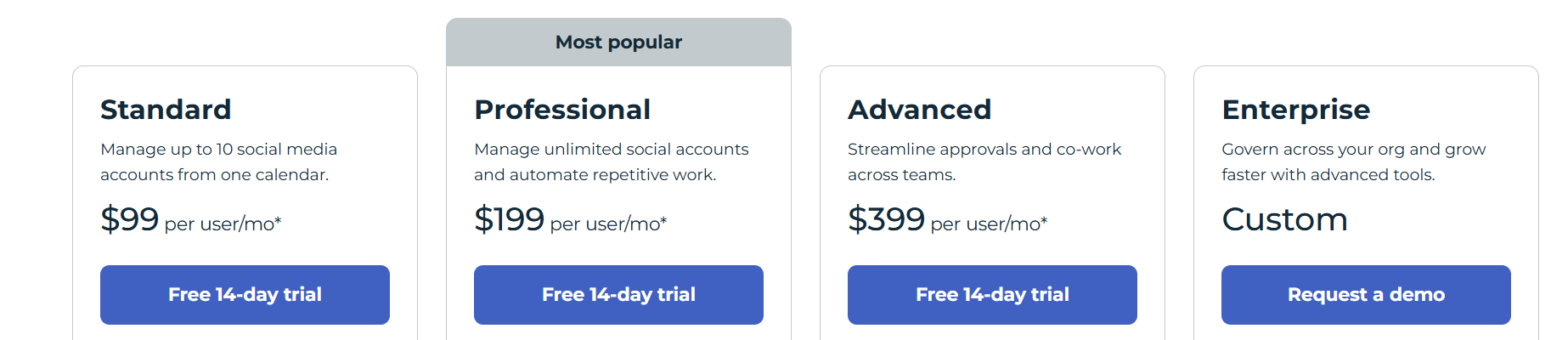
Keep that $99 per user per month entry price in mind. Every tool below except eClincher comes in under it, and most of them don't charge per seat at all.
1. Best for content curation & scheduling: Post Planner
Post Planner is perfect for small businesses that need an affordable way to create, curate, and schedule social media posts.
How much more affordable are we talking? A LOT — Hootsuite's lowest plan is $99/month, while Post Planner's is just $9/month (not counting Post Planner's free plan). 🤯
Post Planner offers the most sought-after features and functions that Hootsuite offers — but at a fraction of the cost.
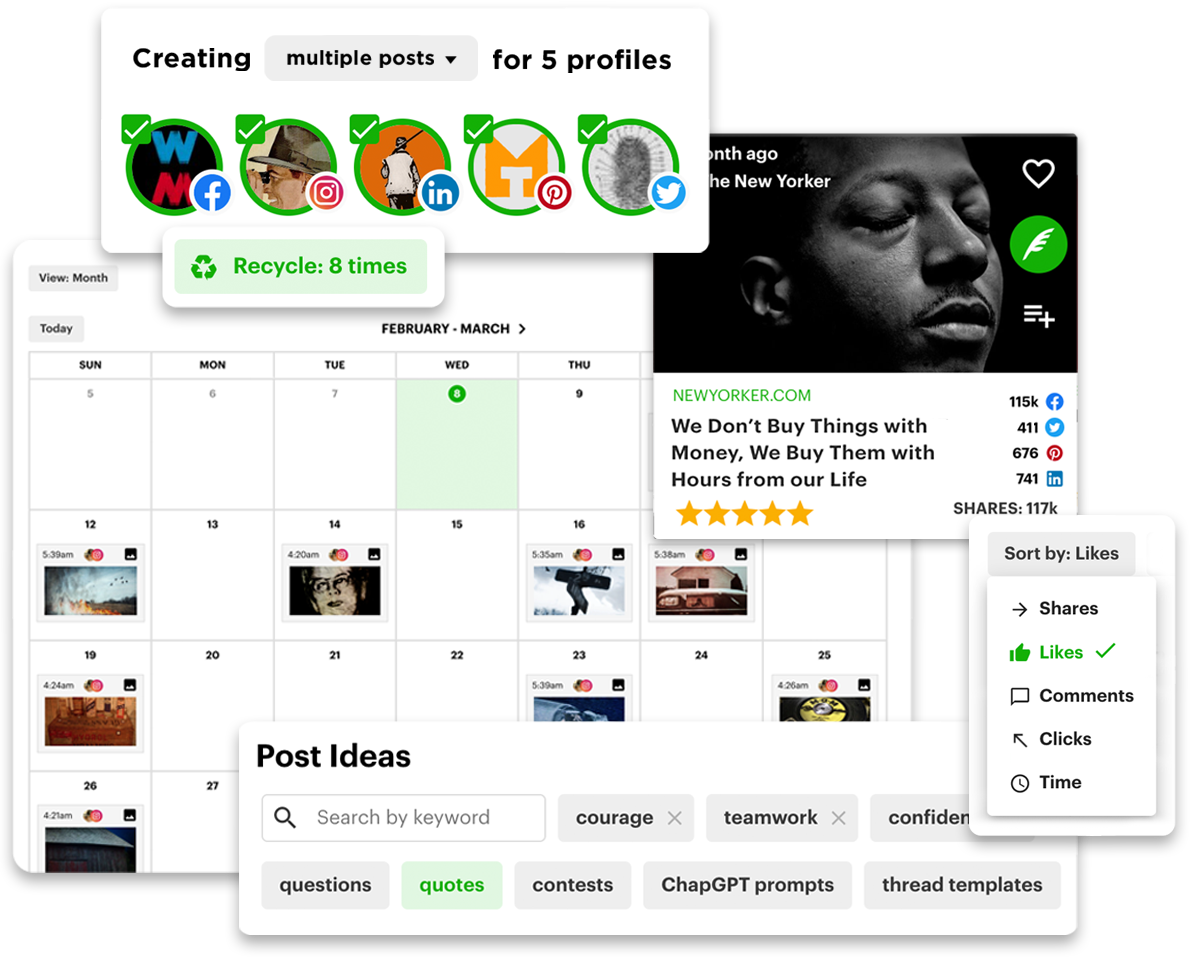
Unlike Hootsuite, which offers a bunch of different features that most social media marketers aren't going to use, Post Planner focuses on the essentials. This means Post Planner's bread and butter is:
- Helping you find VIRAL post ideas
- Helping you create VIRAL content
- Scheduling and automating your posts across networks
Post Planner does not currently have features for social listening, DM & comment management, and employee advocacy, so if those are important to your company, consider the other (much) more expensive options below.
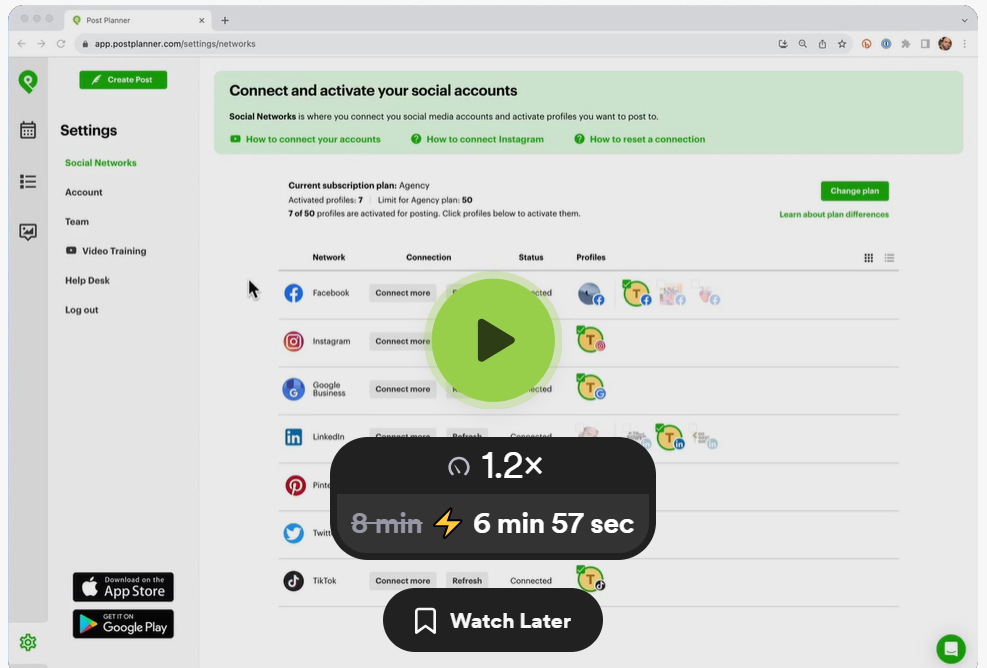
Here's a demo video that shows you just how simple it is to use (the video will open in a new tab):
Pros
- Personal and quick customer support
- Affordable for small businesses
- The interface is simple and easy to use
- Easily schedule weeks of content in an afternoon.
- Identify trending content for sharing.
- You can recycle top-performing posts.
- Bulk post scheduling
- Follow any public Facebook page or subreddit, including competitors, in a content stream
- AI caption and hashtag writing is unlimited on every plan, including Free, unlike most of the other competitors who meter their AI features.
- AI content creation tools that help you never run out of ideas
- A lot of other scheduling tools don’t cover TOBI (Text-on-background-image) posts for Facebook, but Post Planner does (starting from the Growth plan).
Cons
- Although Post Planner helps you track your engagement, its reporting features are simpler than the other tools on this list.
- No social listening tools
- No inbox to manage comments and DMs
Key features
- Discover - Curate content from around the web to share. You can curate content from ANY public Facebook page, Reddit subreddit, Bluesky feed, or RSS feed. You can also search by keyword for top content from Google, YouTube, Giphy, Unsplash, Pixabay, Pexels, and more. You can curate social articles up to 3 days old (from all networks) and stock media on all pricing plans. If you’d like to curate articles older than 3 days and other content formats such as GIFs, videos, images, quotes, etc., you’d need the Growth plan or higher.
Design - Create your own visual posts with our content studio. - Categorize - Organize your content into bucket categories.
- Create - Tailor each of your posts to be optimized for each social media platform.
- Analyze - Evaluate your historical posts' engagement and performance.
- AI tool - Generate post ideas, content, captions, hashtags, and more with AI. You can also create original images for your social media posts from a text prompt in the composer.
- Mobile app - Create and schedule content from your mobile device with the IOS or Android app.
- Schedule - Automate your content to be posted (including TikTok photo and carousel posts) at the perfect time with bulk scheduling and post-recycling. Post Planner provides 5 ways for you to bulk schedule your posts:
- Upload images or add videos from your Library.
- Upload articles from an RSS feed.
- Upload a spreadsheet
- Add content from other feeds.
- Add images from your Chrome browser through Post Planner’s Chrome extension.
- Additionally, for pricing plans: Growth and above, you can schedule a first comment, schedule multiple comments, and set a custom or randomized delay.
- Connect - All of your social media accounts in one place (Facebook, Instagram, LinkedIn, X, TikTok, YouTube, Threads, Bluesky, Pinterest, and Google Business). To connect X and Pinterest accounts, you need to be on the Growth plan or higher.
Why is Post Planner the best for content curation & scheduling?
A fraction of Hootsuite's cost ($9 vs. $99/mo) while covering the essentials (curation, creation, and scheduling) without the bloat of features most marketers never touch. Its Discover tool pairs curated content with 5 bulk-scheduling methods and post recycling: a full curate-to-schedule loop.
Pricing
Post Planner offers 5 main plans:
- Free - 1 user and account with 10 scheduled posts in a queue at a time
- Starter - $9/month, paid annually for 1 user and 3 accounts
- Growth - $39/month, paid annually for 2 users and 15 accounts. On the Growth plan, here are a couple of features that aren’t included in the Starter plan:
- Facebook text-on-background-image (TOBI) posts
- Unlimited Snippets and Drafts
- Tagging other accounts in posts
- First Comment scheduling
- Business - $69/month, paid annually for 5 users and 25 accounts
- Agency - $119/month, paid annually for 10 users and 50 accounts. On the Agency plan, you can make your content streams private to your own team, so only your team can leverage your own streams to increase engagement.
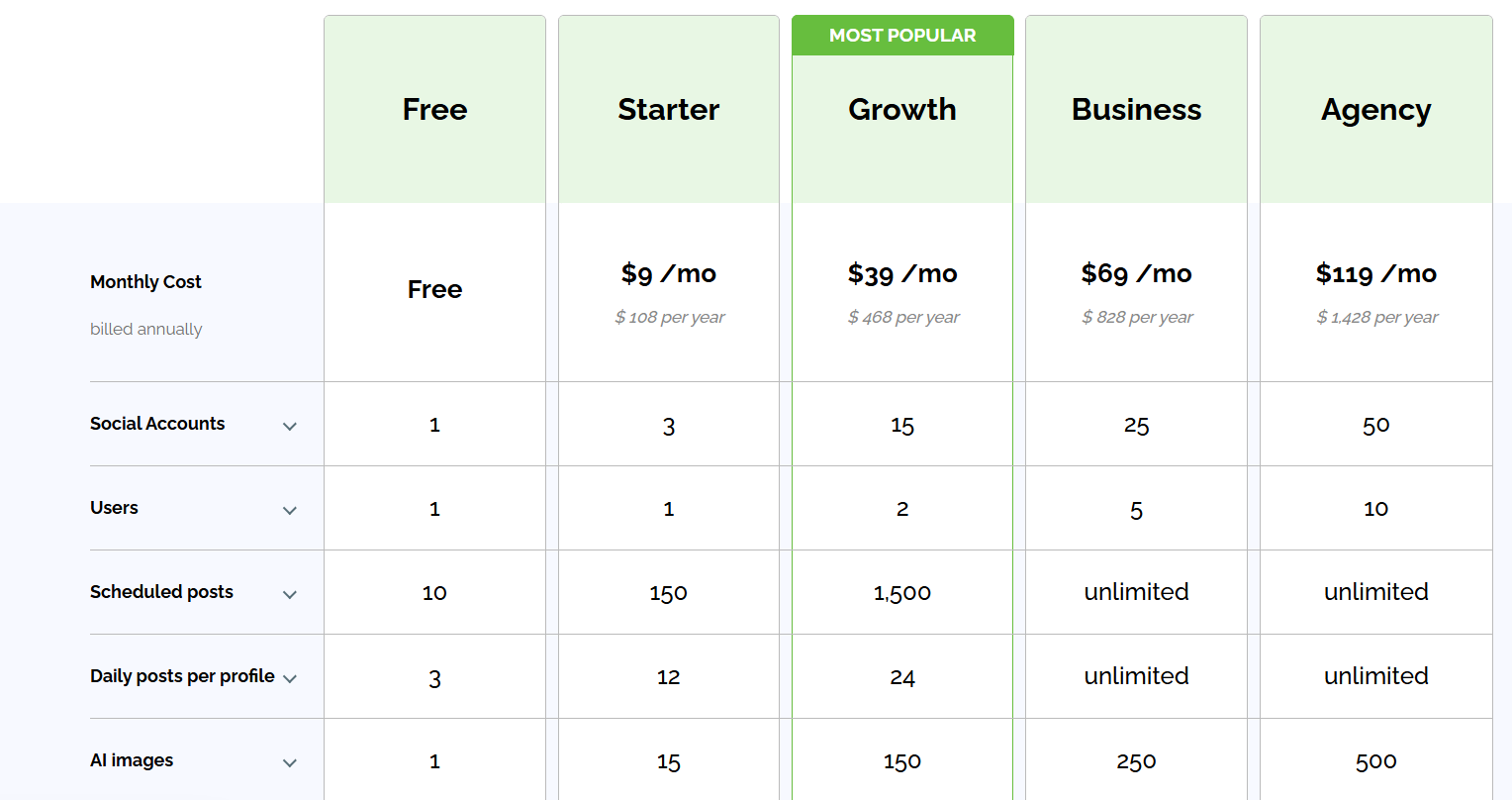
Visit our pricing page for more details on each plan.
Customer reviews
Post Planner holds a 4.8-star average on Trustpilot from 180+ reviews. Customers love the time they save scheduling their posts with Post Planner's easy-to-navigate UI. Some more critical reviews mention that they wish there were more advanced reporting features.
Here's what Danielle has to say about using Post Planner:
“Excellent. I love using post planner to enhance the social media experience for my business. Even a colleague of mine used it and switched from Hootsuite to post planner! It's a dream come true.”
2. Good alternative for engagement management: Buffer
Buffer's simple design and UX make scheduling, posting, and collaborating an intuitive process.
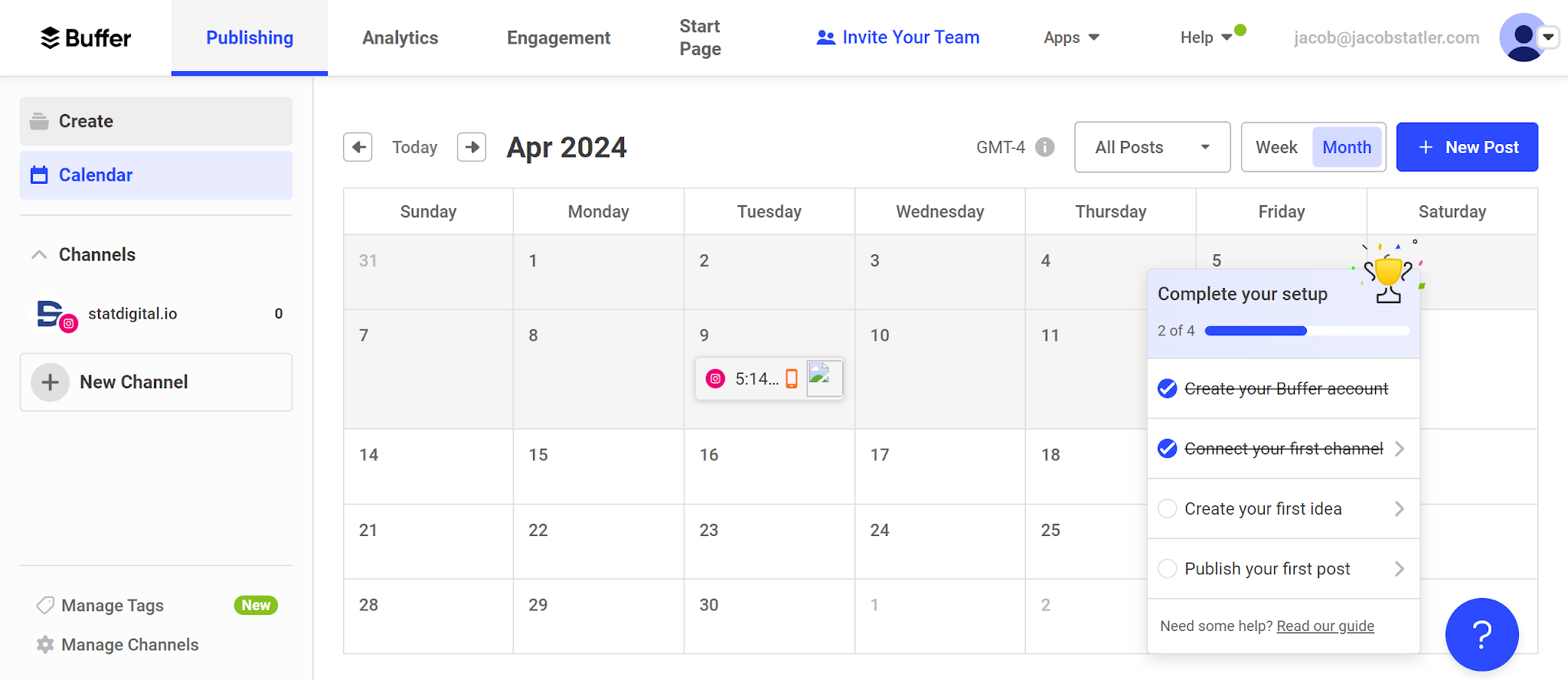
Buffer can connect to Instagram, Facebook, X, LinkedIn, Pinterest, TikTok, YouTube, Threads, Bluesky, Google Business, and even Mastodon.
Even though Buffer can connect to all these platforms, Instagram is where it really shines.
Since Instagram only allows users to share one link in their bio, Buffer allows you to make a landing page that allows you to share various links and calls-to-action. This is a standout feature that'll help you turn your Instagram traffic into sales and signups.
Similar to Hootsuite, Buffer suffers because it doesn’t provide the user with a solution for finding posts. Its suite of tools is excellent for planning and scheduling, but it doesn’t allow the user to quickly and efficiently find the top posts in their niche.
Buffer is heavily focused on teams and analytics. If you’re just looking for something to help you provide better content for your followers, it may not be for you.
Pros
- Team collaboration features
- Supports the social media Mastodon, unlike other tools on this list.
- In-depth analytics & dashboard
- Great for converting your social traffic into sales with its link shortener and landing page tools
- Offers a free forever plan
Cons
- Pricing can get expensive because they charge for each social media platform you use
- No features to find the top content in your industry
Key features
- Scheduler – Plan and publish platform-specific content to Instagram, TikTok, LinkedIn, Facebook, Pinterest, YouTube, Threads, X, and Bluesky from one dashboard
- AI Assistant – Repurpose posts, rewrite drafts, and generate new ideas instantly with built-in AI that adapts to your tone
- Collaboration – Assign roles, manage approval workflows, and leave internal comments on drafts with real-time updates.
- Shared Calendar – Track all scheduled posts in a visual team calendar with role-based permissions and scheduling control
- Community – Buffer’s Community feature pulls comments from every connected channel into one place, with filters, saved replies, AI replies, and a comment score that tracks how fast and consistently you respond
- Insights – Track audience growth, post performance, and engagement trends across channels with exportable reports
- Content Workspace – Store content ideas, tag and categorize drafts, and track progress from creation to publication
- Integrations – Import and manage media from Google Drive, Dropbox, Canva, RSS feeds, and browser extensions.
- Link in Bio (Start Page) – Build a customizable link-in-bio landing page with themes, media, product links, and performance tracking
Why is Buffer a good alternative for engagement management?
Simpler, more intuitive UX than Hootsuite, plus a built-in link-in-bio tool Hootsuite doesn't offer. Its Community inbox pulls comments and mentions into one place, backed by shared calendars and approval workflows.
Pricing
Unlike some of the other schedulers on this list, Buffer charges you per channel that you use.
Buffer offers 3 main pricing plans (you get a 14-day free trial for the Essentials and Team plans):
- Free forever - 1 user and 3 accounts with 10 scheduled posts per channel that can be refilled at any time
- Essentials - $5/month per channel, paid annually for 1 user
- Team - $10/month per channel, paid annually for unlimited users.
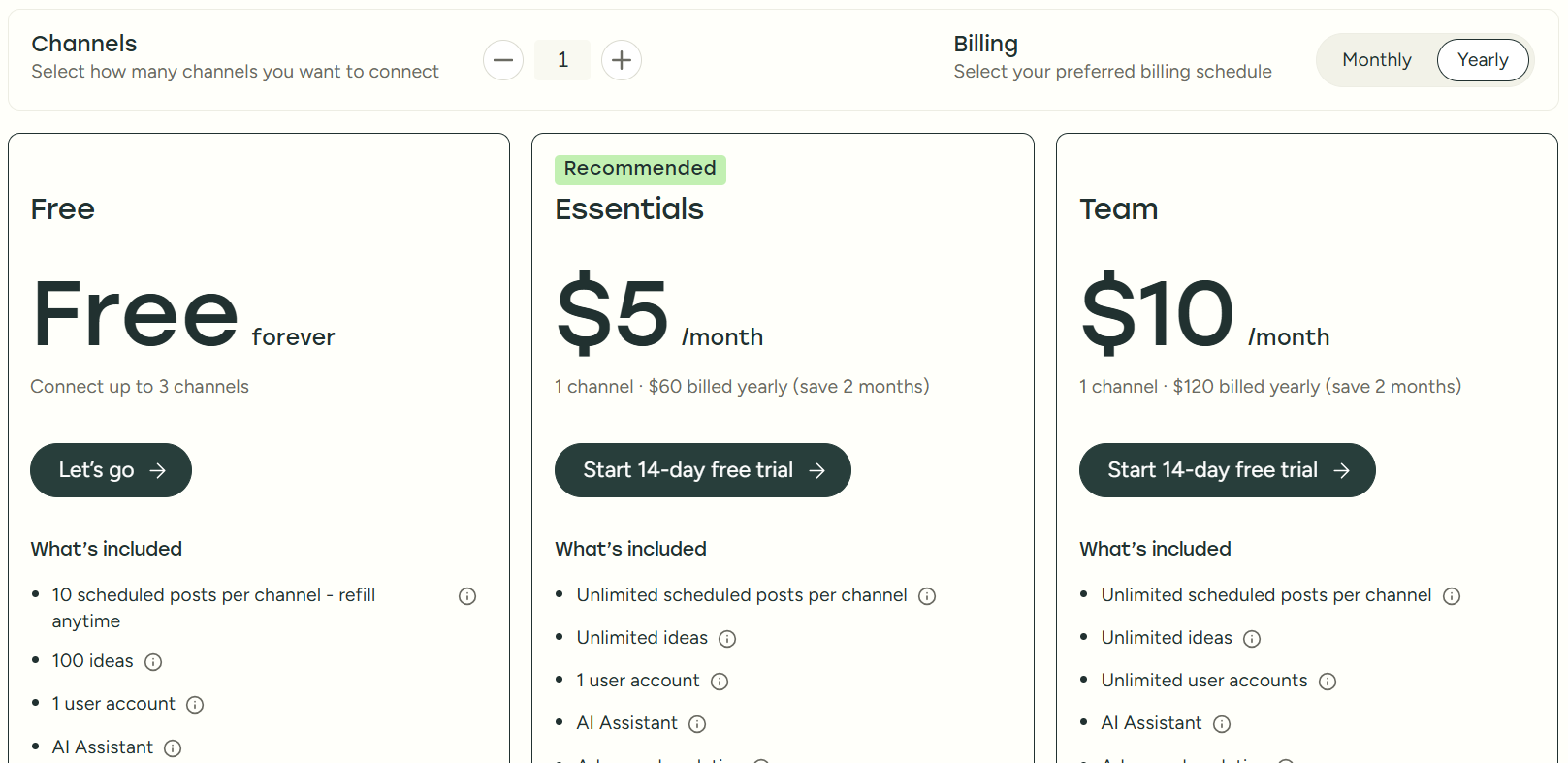
I recommend checking out Buffer's pricing page for more details.
Customer reviews
Buffer holds a 4.3-star average on G2 from 1,000+ reviews. Most users value its scheduling, social media management, and analytics features. On the other hand, sometimes users comment on the UI being a bit funky and dislike the pricing structure being based on channels.
Here's what Lisana C. has to say about using Buffer:
"What do you like best about Buffer?
I like that Buffer is intuitive. I appreciate how easy it is to connect the API, as well as the queue function for content approval. I also like how I can have all accounts separated, even if they are from the same social network.
What do you dislike about Buffer?
I find the timeline for scheduling posts confusing, especially when scheduling daily posts."
3. Best value for enterprise-level features: Statusbrew
Statusbrew is one of the best-value Hootsuite alternatives for agencies, teams, and growing businesses that want access to enterprise-level features from $69/month.
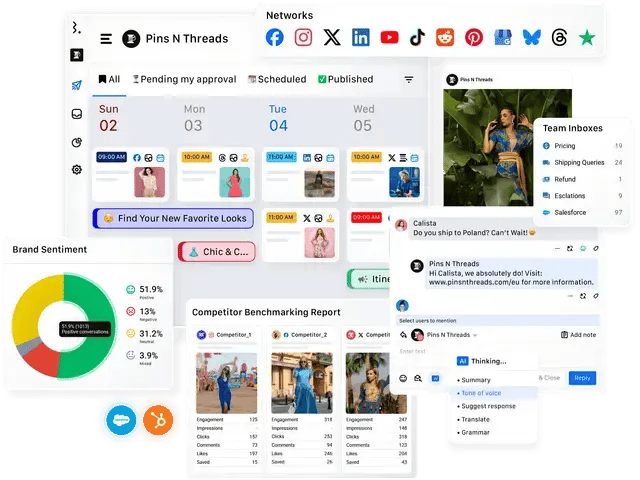
Right after trying the 14-day free trial, I was struck by how clean and intuitive the UI was. Everything from scheduling to reporting to managing DMs felt straightforward, and I didn’t need a walkthrough to get started.
If I were part of a social media agency or a marketing team managing multiple brands, I’d pick Statusbrew for how easy it makes collaboration, content approvals, and managing all conversations (even ad comments) from one place.
It’s also great that agencies don't NEED to pay more to add teammates (they offer plans that come with more users). They offer flexible pricing for growing teams and agencies, allowing you to add social profiles and users to the plan of your choice.
The one thing that could be improved was the post preview feature. While functional, it’s not as visual as some other tools. Also, TikTok listening is not great, which isn’t a dealbreaker, but worth noting.
Pros
- More affordable than Hootsuite
- Clean and fast UI
- Unified inbox for organic + paid comments and reviews
- Approval workflows and post-labeling
- 250+ KPIs for reporting
- Canva, HubSpot, Bitly, and Slack integrations
Cons
- TikTok listening is not that great.
- Post previews could be more visual.
Key features
- Unified inbox – Manage comments, messages, reviews, and ad replies in one place
- Scheduling & approvals – Schedule posts in bulk with team workflows
- Custom reporting – Build tailored reports from 250+ metrics
- Social listening – Monitor sentiment, competitors, and crisis terms
- Labeling – Track performance by campaigns, goals, or tags
- Workspaces – Separate brands or clients with permission controls
- Integrations – Canva, HubSpot, Bitly, Slack, Google Drive, Dropbox
- Compatible networks – Facebook, Instagram, LinkedIn, X (Twitter), YouTube, Threads, Pinterest, Google Business, TikTok, Bluesky, App Store, and Google Play Store.
Why is Statusbrew the best value for enterprise-level features?
For $69/mo you get a unified inbox for organic and paid comments, 250+ reporting metrics, and approval workflows, without Hootsuite's Enterprise-tier price tag.
Pricing
Statusbrew offers a 14-day free trial — no credit card needed.
They offer 4 main plans:
- Lite – $69/month billed yearly for 1 user & 5 profiles
- Standard – $129/month billed yearly for 3 users & 10 profiles
- Premium – $229/month billed yearly for 6 users & 15 profiles.
- Enterprise – For organizations that need custom support alongside MCP support across Claude/ChatGPT/Gemini/Copilot.
They also offer a $49/month/client plan for growing agencies with unlimited spaces, shareable calendars, reports, etc.
Customer reviews
Statusbrew holds a 4.8-star average on G2 from 260 reviews. Users appreciate the balance of power and simplicity, especially for multi-brand management, collaborative workflows, and advanced reporting.
Here's what Qque S. has to say about using Statusbrew:
"What do you like best about Statusbrew?
Initially, I was using two different solutions for social media management, monitoring, and analytics. StatusBrew solved that problem at a fraction of the cost. It’s feature-rich, and for small and medium firms and agencies, there’s no need to keep separate tools for management and monitoring. It does a solid job in one place.
Onboarding is streamlined, and agents don’t need passwords for social accounts; clients can verify themselves instead.
The interface takes a little getting used to, but customer care is excellent, especially considering the learning curve.
The AI features and integrations are impressive.
Pricing is good and transparent (and can be personalized). Customer care takes you through based on your needs and budget. No hidden costs or upselling.
Performance is on par with the industry giants, and it supports all the main social media platforms. Usability is good once you get the hang of it.
Analytics and reporting are in-depth, with customization through templates (widgets) and personalization options.
Overall, it improves workflow with predefined settings, role allocation, and access control. Great collaboration within and outside the system.
It offers decent integrations ( Bitly, Google Analytics, Slack, and common AIs (ChatGPT and Claude) This is critical for automation and agentic workflows and collaboration.
Frequent system updates to keep up with the dynamic social media environment and trends.
What do you dislike about Statusbrew?
The initial setup process can feel a bit overwhelming, especially for average users. Getting the reports configured and setting up personalization can be challenging at first. However, the customer support team does an excellent job and is very helpful.
The analytics and monitoring features aren’t as in-depth as those offered by the major players.
Analytics and reporting features could also benefit from AI to improve personalization and creation of presentation-ready reports with narratives to summarize and explain the charts and figures."
4. Good choice for agencies: Sendible
Sendible is a scalable social media management software that's full of features that would be a great fit for agencies.
After signing up for their free trial, I was very pleased with how easy their dashboard was to navigate. I could easily figure out how to use each feature.
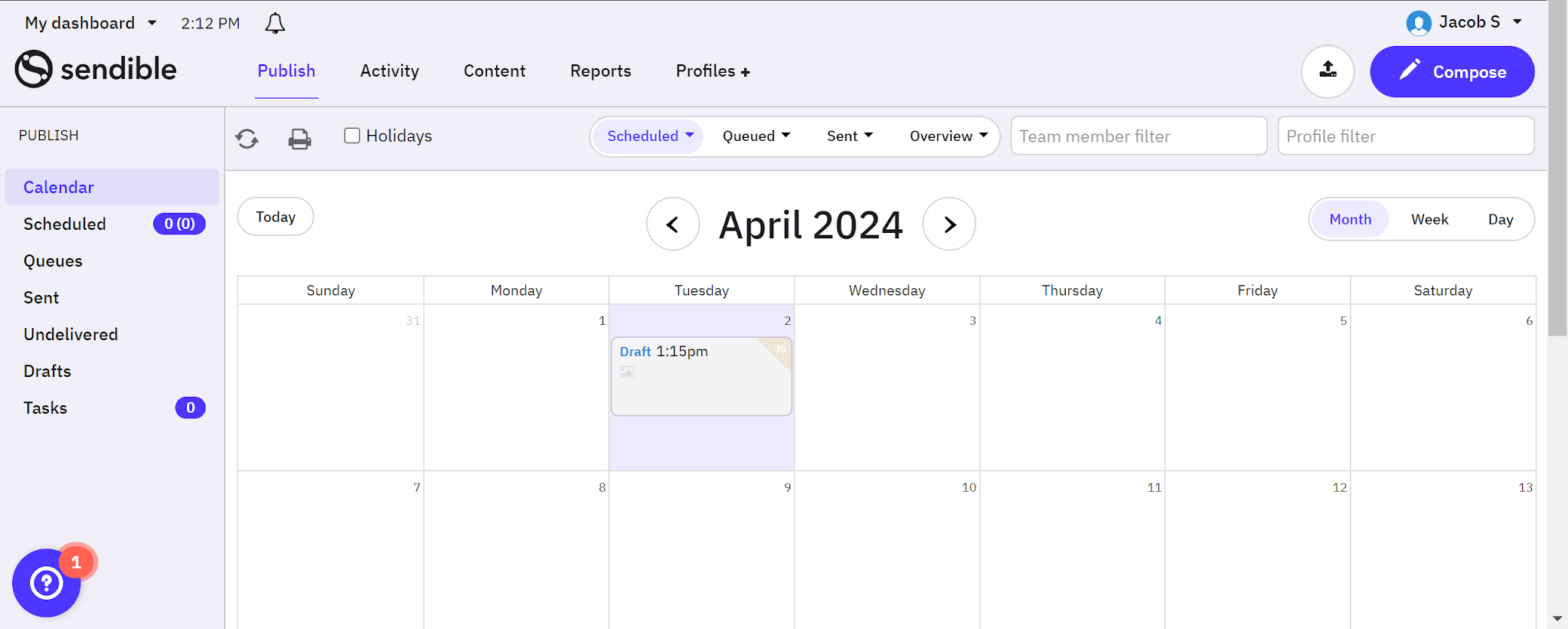
If I were a social media marketing agency, I'd strongly consider using Sendible because of its collaboration and white-labeling features, which can help you better manage clients.
When I was scouring online reviews, I struggled to find many cons about using Sendible that weren't inherent to most social media management platforms. It's not the most cost-friendly tool on the list, but I'd still consider it a high-value option for its agency-focused features.
The main drawback I noticed was the lack of content curation features, which is nice to have if you often struggle to come up with post ideas.
Pros
- Sendible is more affordable at the entry plans, and cheaper at any team size because users are unlimited. You also get unlimited AI credits on each pricing plan.
- Allows team collaboration
- Unlimited post scheduling for every pricing plan
- Known for quick customer support
- White-label features are available on the Elite and Enterprise plans as an add-on.
- Content optimization for each network
- Manage DMs and comments from one platform.
Cons
- Costs more than Post Planner
- Doesn't list an employee advocacy tool (Hootsuite has Parliament)
- Limited content curation, although you can add your own content to a library and view RSS feeds.
Key features
- Smart Compose Box – Customize, repurpose, and preview posts for each platform from one central dashboard
- AI Assist – Instantly generate captions, content ideas, and hashtags aligned to your brand voice.
- Smart Queues – Recycle evergreen content like testimonials, holidays, and quotes using automated reposting queues
- Bulk Importing – Upload and schedule multiple posts at once via CSV or Compose Box to save time.
- Priority Inbox – Manage all social comments, DMs, and mentions in one place. Assign to team members and filter by profile or date
- Campaign Management – Organize posts into campaigns, color-code them, and track performance over time
- Collaboration – Assign tasks, request approvals, manage roles, and invite clients without giving admin access
- Content Library – Store and categorize reusable content (text, images, hashtags) by type, campaign, or client
- Media Integrations – Design in Canva, pull visuals from GIPHY and Pexels, and import directly from Google Drive or Dropbox
- Social Media Reporting – Use drag-and-drop dashboards to build custom branded reports and schedule them to send automatically.
- UTM & Custom Tags – Add custom URLs, campaign parameters, and brand info to posts directly in Compose Box
- Platform Coverage – Supports Facebook, Instagram, LinkedIn, TikTok, Google Business, YouTube, Threads, Bluesky, X (Twitter), and WordPress
Why is Sendible a good choice for agencies?
Pricing isn't per seat like Hootsuite's. Unlimited users on every plan, plus white labeling and a Priority Inbox, let agencies manage many clients without per-seat costs piling up.
Pricing
Sendible offers a 14-day free trial with no credit card required.
They offer 5 main plans, each available for unlimited users:
- Core – $30/month paid annually for 1 workspace, 6 social profiles
- Plus – $84/month paid annually for 3 workspaces, 18 social profiles
- Premium – $169/month paid annually for 7 workspaces, 42 social profiles
- Elite – $254/month paid annually for 15 workspaces, 90 social profiles
- Enterprise – $638/month paid annually for 50 workspaces, 300 social profiles.
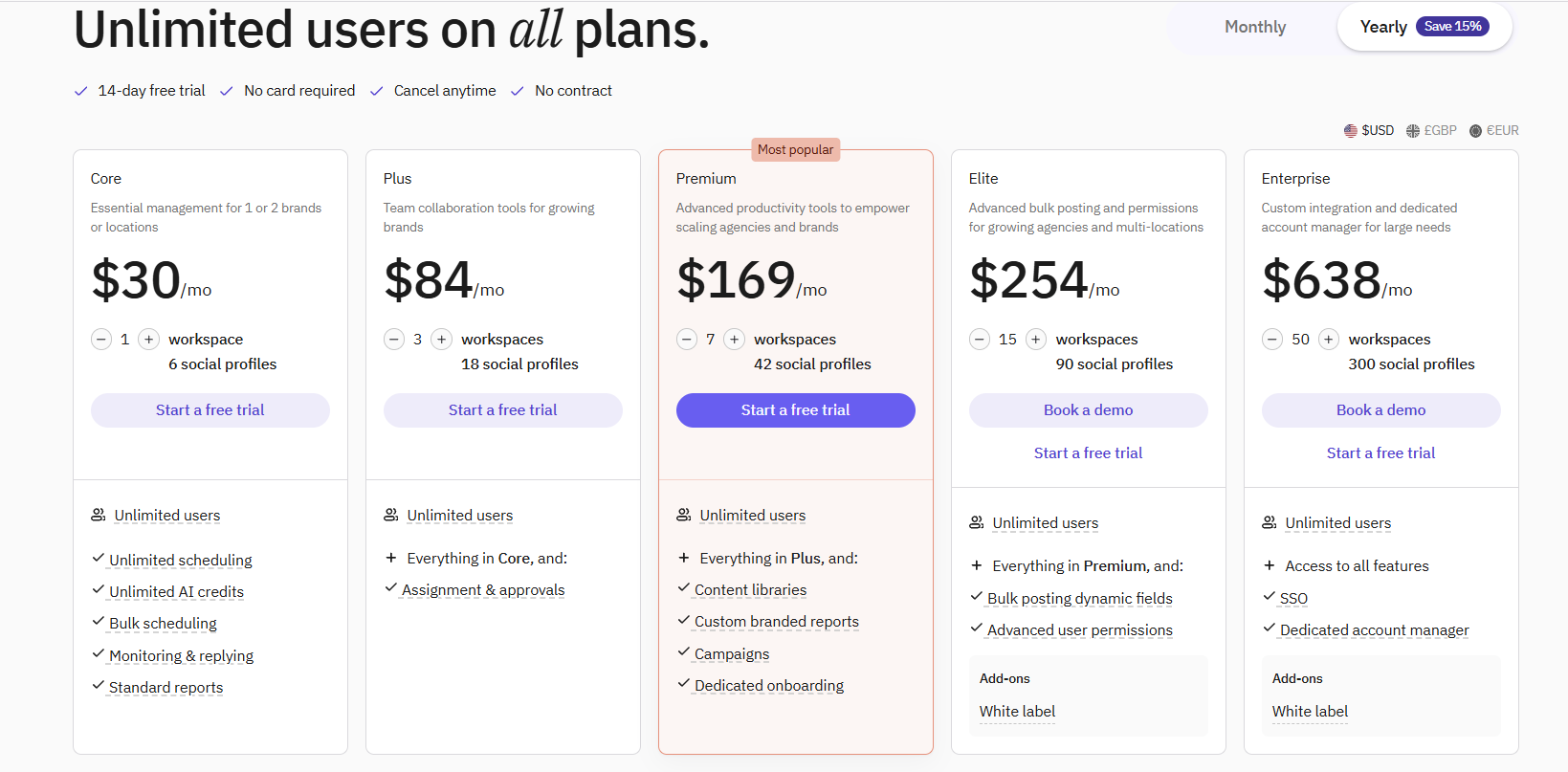
I recommend checking out Sendible's pricing page for more details.
Customer reviews
Sendible holds a 4.5-star average on G2 from 900+ reviews. Customers value the amount of features you get for the price. Some reviews mention struggling with bugs when it comes to scheduling different types of Instagram posts.
Here’s what Grace M. has to say:
“What do you like best about Sendible?
I appreciate Sendible's user-friendly platform that outperforms others like Meta Business Suite and Buffer. It's easy to navigate when scheduling numerous posts across different platforms for Got Questions Ministries. Unlike its competitors, everything is easy to find and easy to schedule, and it was easy for me to learn.
What do you dislike about Sendible?
I would like to be able to schedule Instagram posts that have images along with Facebook posts that don't have images all in one place. It would be more time-efficient to do it all at one time rather than beginning another scheduling block for each.”
5. Good for multi-location businesses: eClincher
eClincher is a social media and online reputation management software that was made for multi-location businesses like healthcare clinics.
I recommend trying eClincher's free trial if you're a business with multiple locations and are looking for more advanced features like inbox management, social listening, and business listing management.
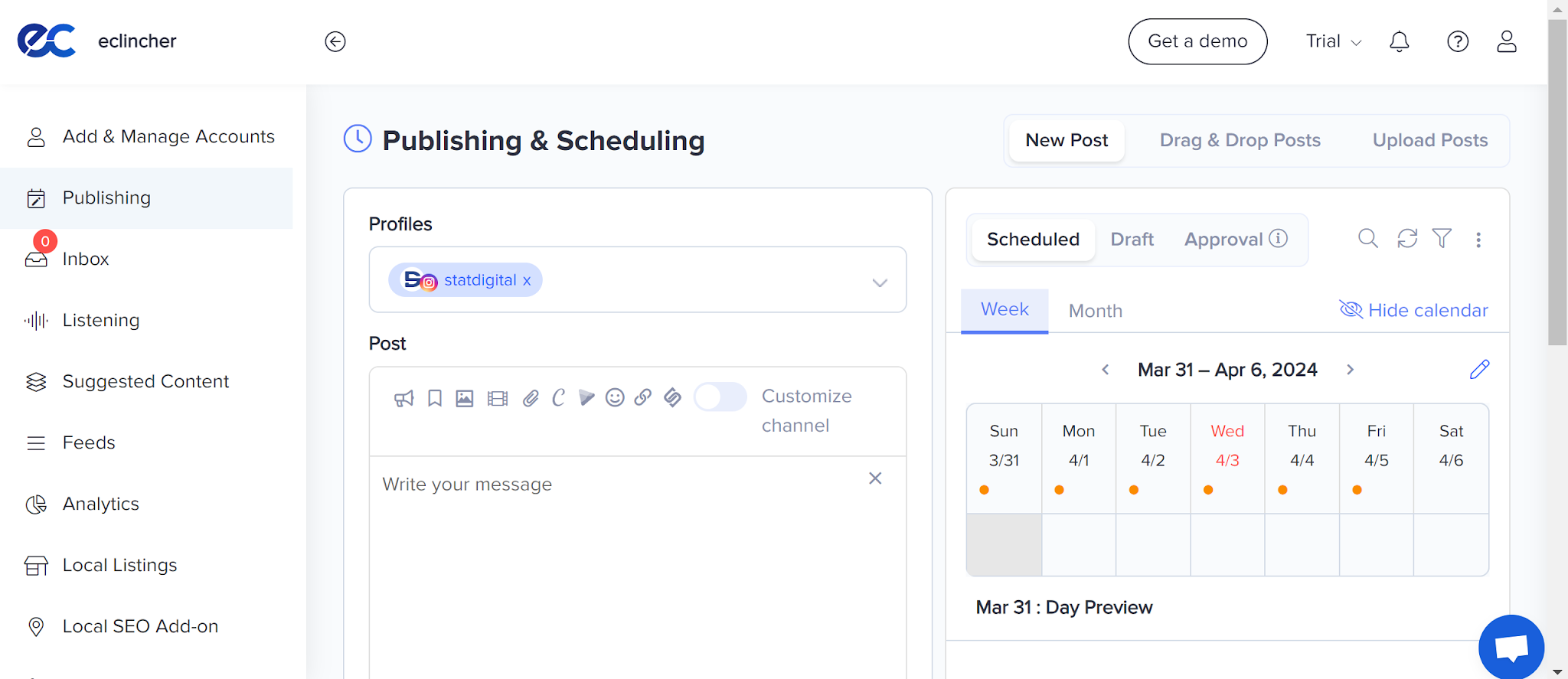
After trying their Standard plan, I was more pleased with the user interface than some of the other reviewers who mentioned it was un-aesthetic. If you don't need more advanced features and you're just looking for a tool that helps with social media content and scheduling, I'd recommend other options because the number of features won't be necessary.
I also found the Standard plan to be limiting for the price tag. For example, it doesn't have access to the media library or employee advocacy, which I think should be standard.
Pros
- Feature-rich with tools that help you manage your online presence.
- Comes with tools for social listening and managing your DMs
- You can get a local SEO tool (for an additional cost).
- Attentive customer support
- Optimize content for each social network.
- Can easily review posts from your team before scheduling
- Comes with a link in bio tool
Cons
- Less intuitive with the overload of features
- More expensive than Post Planner
- Limited content curation and reporting tools for their entry-level plan
Key features
- AI Content Creation – Generate on-brand posts with adjustable tone, keyword suggestions, and multiple content variations
- Social Media Scheduler – Automate posting for peak times using drag-and-drop rescheduling, visual calendar, and queue logic
- Social Media Calendar – Visualize all posts in one calendar view. Filter by profile, type, or campaign and manage weekly and monthly schedules
- Social Media Inbox – Centralize DMs, mentions, comments, and reviews with tagging, AI-powered auto-reply, sentiment detection, and team assignments
- Social Media Analytics – Track audience insights, content performance, sentiment, and engagement trends with drag-and-drop reporting dashboards
- Link in Bio – Create branded Instagram-style landing pages with visual grids, CTAs, product highlights, and event promotions
- Employee Advocacy – Let employees share approved posts via a centralized content hub, then track performance with leaderboards and recognition badges.
- Brand Monitoring & Social Listening – Monitor conversations and sentiment across social and web to manage brand health
- Listings Management – Update and sync your business info (hours, descriptions, keywords, promos) across Google, Bing, and other platforms in real time from one dashboard.
Why is eClincher good for multi-location businesses?
Pricier than Hootsuite's entry plan, but its Listings Management keeps business info in sync in real time across directories, which multi-location businesses like clinics need and Hootsuite doesn't offer.
Pricing
eClincher's entry-level plan costs more than Hootsuite's.
eClincher offers a 14-day free trial and 3 plans:
- Standard – $134/month paid annually for 1 brand, 1 user (max 2), 15 social profiles (max 20)
- Professional – $314/month paid annually for unlimited brands, 5 users (max 10), 25 social profiles (max 40)
- Enterprise – Custom pricing for everything in Professional, plus unlimited brands, users, profiles, brand monitoring, listings management, SSO, and API access
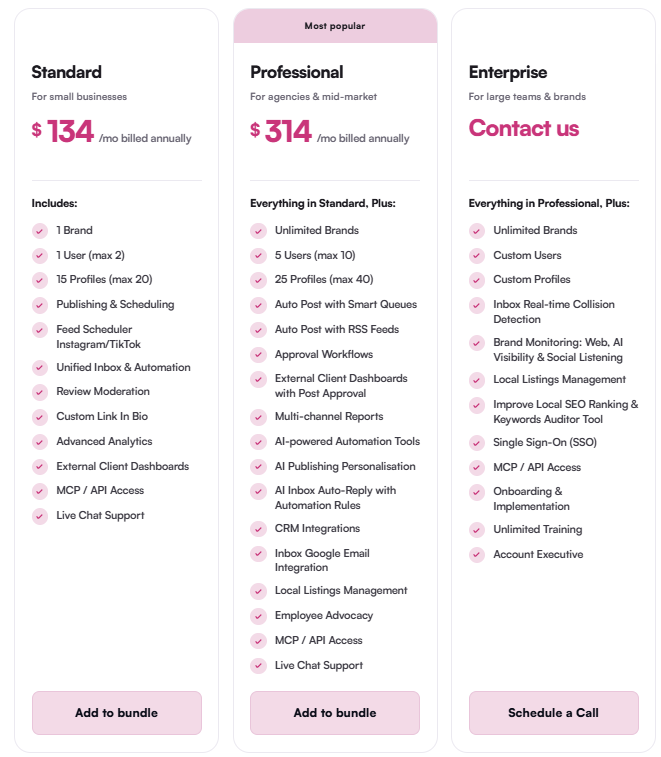
I recommend checking out eClincher's pricing page for more details.
Customer reviews
eClincher holds a 4.6-star average on G2 from 440+ reviews. Users value the quality customer support and loads of features for local businesses. More critical reviewers, which there are few, sometimes mention glitches and there being a learning curve for all of the features.
Here’s what Marc-André D. has to say:
“What do you like best about Eclincher?
I love Eclincher's customer service and their efficiency in resolving issues. They deliver exactly what the tool promises. I greatly appreciate the Local SEO module, which is extremely effective and efficient. It helps me improve the SEO of the businesses I work with, and we have seen a reduction in cost per click of 20 to 50% on our media campaigns thanks to the addition of posts on Google My Business. I also use the Analytics section for all reports. Eclincher is the only tool I have used that allows for generating real-time interactions while combining local SEO and advanced analytics.
What do you dislike about Eclincher?
I don't feel that all the mentions are listed during the scan.”
6. Simple tool for scheduling: HeyOrca
HeyOrca customers seem to love HeyOrca for 2 main reasons: It's simple to use, AND they have fast customer support.
They make it super easy to switch to different calendars, which is useful if you're an agency that manages multiple clients' social media.
After signing up for the free trial, I can confirm that they do have one of the most straightforward social calendars.
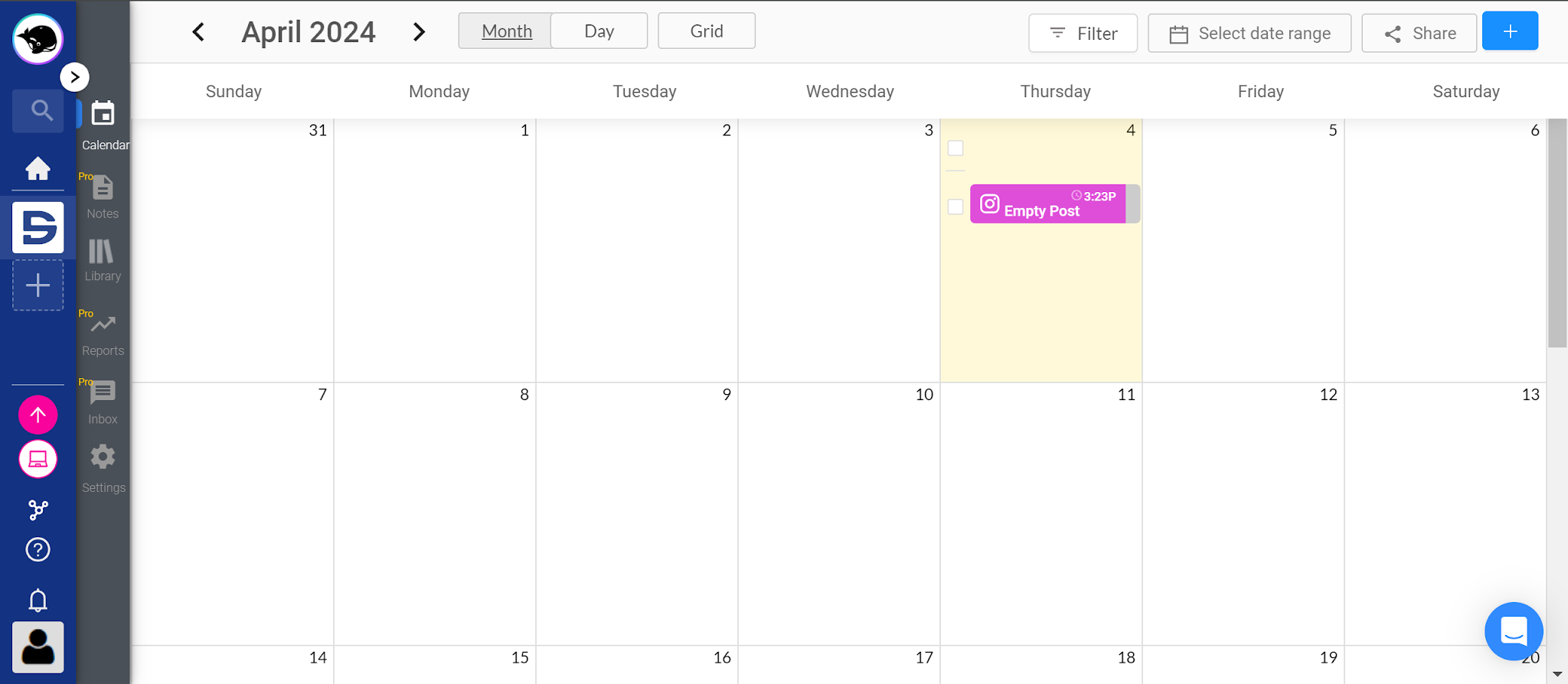
It might lack tools that its competitors have (like better content curation), but I do like how they keep their features limited so users don't get overwhelmed.
Another note to keep in mind when comparing HeyOrca to Hootsuite: Although the Basic plan with 1 calendar is more affordable than Hootsuite, it does get pricey if you have to add more calendars. However, they do give you unlimited users and scheduled posts, unlike other tools on this list.
Pros
- Quick customer service (a lot of customer reviews rave about this)
- Simple social media scheduler
- Helpful community of users
- Can manage comments and DMs from their social inbox
- Comes with a post approval system for managing clients
Cons
- Not as affordable as Post Planner
- Limited Basic plan
- You'll either need the Pro plan for features like Reports, social listening, and Inbox, or include it as paid add-ons for the Basic plan, which makes it less affordable if you need those features.
Key features
- Scheduling - Plan and schedule posts across Facebook, Instagram, LinkedIn, TikTok, Pinterest, YouTube (Shorts and videos), Google Business Profile, and Threads.
- Collaboration - Work together with teammates and clients to create, approve, and leave feedback on content.
- Reporting - Create automatic reports that track reactions, comments, shares, clicks, page actions, and more.
- Community management - Manage comments, DMs, and brand mentions from one social inbox.
- Mobile app - Manage posts via the iOS or Android app
- Bio link - Create a landing page with links for your Instagram bio
Why is HeyOrca a simple tool for scheduling?
Cheaper entry point than Hootsuite and no per-user charges. Unlimited users and posts on every plan, a clean calendar, and fast support keep the learning curve low (pricing climbs if you need multiple calendars).
Pricing
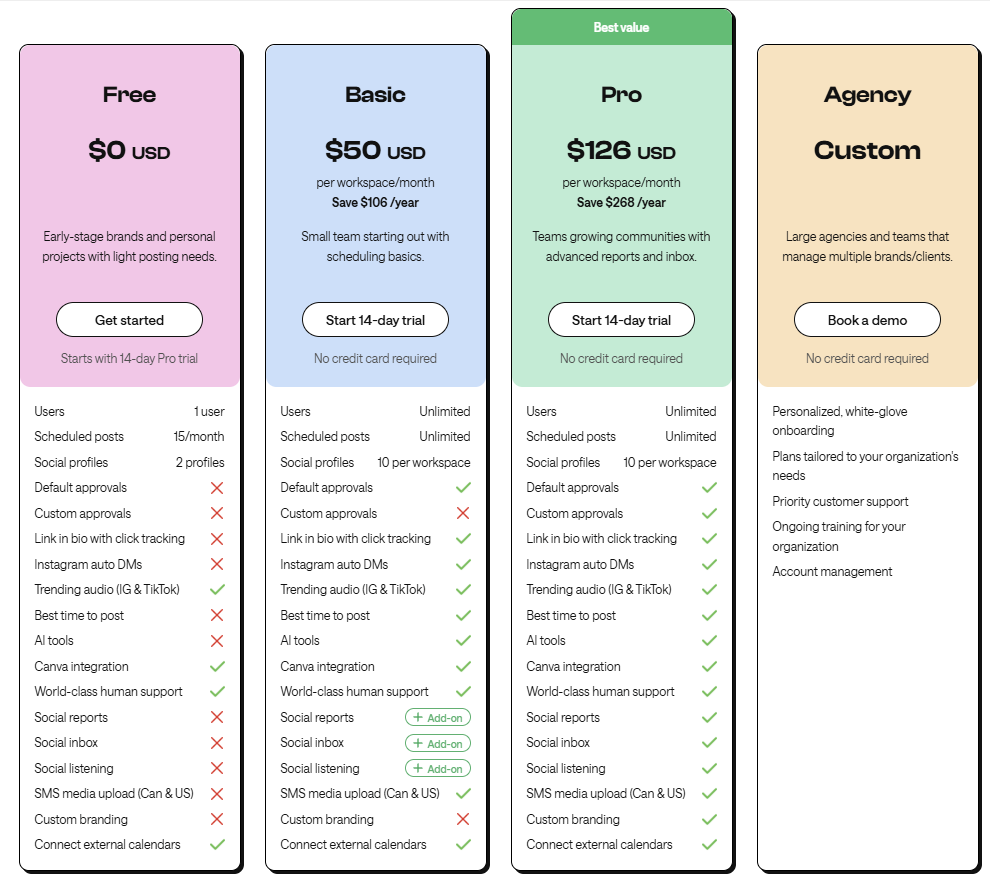
All of HeyOrca's pricing plans come with unlimited users and unlimited post scheduling. However, you'll have to pay more for additional content calendars.
HeyOrca has a free plan for 1 user, 15 scheduled posts/month, and 2 profiles. They have 3 main pricing plans with 14-day free trials for Basic and Pro plans:
- Basic - $50/workspace/month paid annually for 10 social profiles per workspace.
- Pro - $126/workspace/month paid annually for 10 social profiles per workspace.
- Agency - Custom pricing for large agencies and teams that manage multiple brands/clients.
HeyOrca also provides the following paid add-ons:
- Social reports for $59/workspace/month (billed monthly)
- Social inbox for $39/workspace/month (billed monthly)
- Social listening for $39/workspace/month (billed monthly)
I recommend checking out HeyOrca's pricing page for more details.
Customer reviews
HeyOrca holds a 4.8-star average on G2 from nearly 300 reviews. Many reviews mention HeyOrca's simplicity and speedy customer service as their most-liked attributes. Of the very few critiques that users have, the price is one of the most common.
Here's what Michelle F. has to say about using HeyOrca:
"What do you like best about HeyOrca?
What I like best about HeyOrca is that it feels built for the reality of managing social media at an agency. We manage ~15 brands across Instagram, TikTok, YouTube, LinkedIn, and more, with five social media managers plus account managers, paid media team members, and clients who all need different levels of access and involvement.
The separate client calendars/workspaces, unlimited users, and approval process make a HUGE difference for us. Our internal team can leave comments and work through feedback directly on a post without the client seeing those conversations, while clients can easily leave their own feedback and approvals in the same place. Before, we had to limit access, share passwords, or tell clients only one person could be involved in approvals. Now we can actually build the process around how our teams work.
The Social Inbox is another feature we use regularly. Being able to manage comments and DMs across Facebook, Instagram, LinkedIn, and TikTok in one place saves our team from constantly logging in and out of different platforms and accounts just to manage community.
We've also found the AI tools genuinely useful rather than just being AI for the sake of AI. We regularly use AI reporting summaries to help pull out insights and explain performance to clients, and I personally use the Brand Voice tools when switching between brands with completely different voices. Brand Sentiment has become one of my favourite features for getting another read on how an audience is feeling about a brand.
One of the unexpected benefits has actually been the feedback from our clients. We've had clients specifically tell us how much easier they find HeyOrca to use for reviewing content, seeing their calendar, and giving feedback.
We've tried a handful of platforms over the years, including some of the bigger names, and HeyOrca has been the one that best fits how our agency actually works.
What do you dislike about HeyOrca?
There isn't much we dislike about HeyOrca, but I'd love to see them continue expanding their social listening capabilities. Brand Sentiment is actually one of my favourite features, and I'd love to be able to take that even further, diving deeper into what audiences are saying, identifying recurring themes and conversations, and getting more robust listening insights across platforms.
For an agency managing multiple brands, having stronger social listening integrated into the same place we're already scheduling, managing community, approving content, and reporting would make an already great tool even more valuable."
7. Budget all-in-one social media management: Loomly
Loomly is a great option if you're looking for a more feature-heavy Hootsuite alternative that can be used across a large team and is a lot more affordable.
I found Loomly’s user interface pretty easy to navigate and its onboarding process easy to follow.
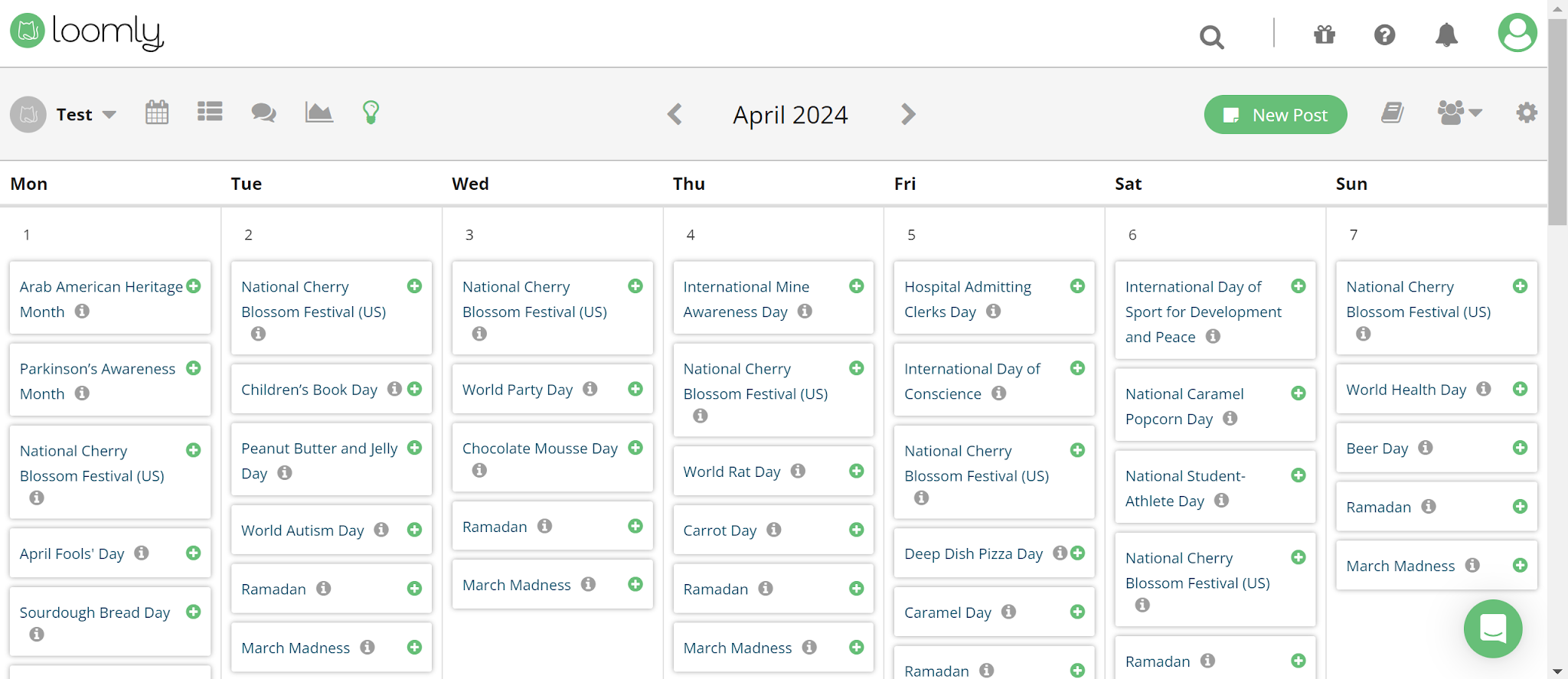
Loomly is one of only 2 tools on this list that supports Snapchat (Vista Social is the other).
It’s designed for teams and agencies that want to plan, approve, and publish social content together, with built-in workflows, comment threads, and client review options. Loomly even gives you post idea suggestions based on trending topics and holidays. Since it was acquired by Bending Spoons, it also provides an AI Assistant chat, Reply with AI, AI analytics, social listening, and an Ideas Board.
Pros
- Intuitive to use
- The approval feature makes managing client content easier.
- Can manage comments and DMs from one place
- Responsive customer support
- Recommends posts based on holidays
Cons
- Increased pricing recently (lowest plan is $49/month paid annually)
- Doesn’t provide X as a platform integration.
- Although it has some content curation features like the Ideas Board, it doesn't help you find viral content like Post Planner.
Key features
- Post Planning & Scheduling – Plan, schedule, and auto-publish content across multiple platforms using a visual content calendar
- Approval Workflows – Customize multi-step content approval processes with mockups, commenting, and role-based permissions.
- Campaign Management – Organize campaigns with labels, track post performance, and view upcoming posts in calendar or list mode.
- Post Optimization Tips – Get channel-specific recommendations to improve post engagement before publishing
- Hashtag Manager – Save and reuse hashtag sets and get recommendations for trending hashtags by platform.
- Post Ideas – Discover daily post suggestions and trending content ideas from within the platform.
- Community Management – Respond to DMs, mentions, and comments across platforms with a shared inbox and saved replies
- Analytics & Reporting – Track post and campaign performance, view audience insights, and export reports in PDF or CSV
- Link Shortener – Use Loom.ly to track post clicks and campaign-level UTM performance.
- Canva, Giphy, Unsplash, and Google Drive – Create or import assets directly into Loomly's media library for post design and publishing
- Platform Coverage – Supports Facebook, Instagram (including Reels, Stories, Carousels), LinkedIn, TikTok, YouTube, Threads, Google Business, Pinterest, and Snapchat
Why is Loomly a budget all-in-one option?
Costs less than Hootsuite while matching much of its feature depth: scheduling, approvals, AI Assistant, and social listening in one platform, plus Snapchat support Hootsuite lacks.
Pricing
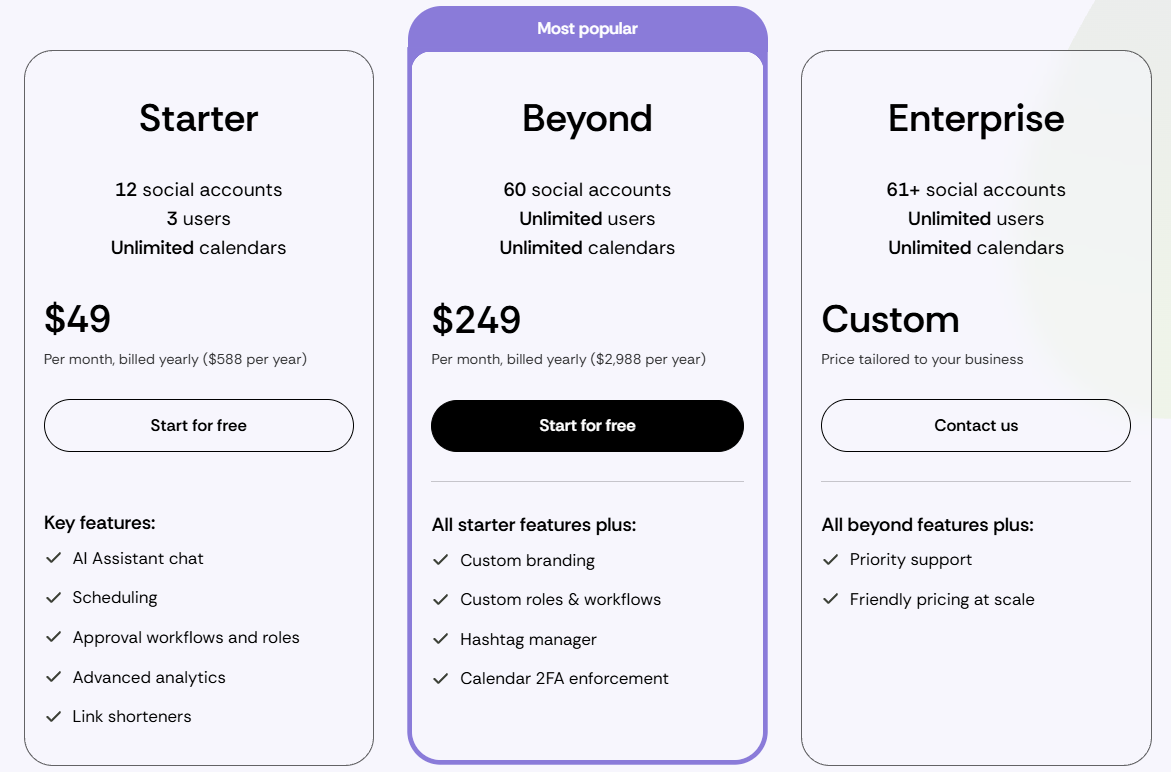
Loomly offers 4 main pricing plans with unlimited calendars on each plan:
- Free - 1 user, 3 accounts, and 5 posts per month (not shown on the pricing page, and Loomly says it isn't available to every account)
- Starter - $49/month paid annually for 3 users and 12 accounts
- Beyond - $249/month paid annually for unlimited users and 60 accounts
- Enterprise - Unlimited users and 61+ accounts (contact for a quote)
Check out Loomly's pricing page for more details.
Customer reviews
Loomly holds a 4.6-star average on G2 from 1,700+ reviews. The most common pro is how easy it is to use. The most common complaint in older reviews was a dated interface, which Loomly has since redesigned.
Here's what Max P. has to say about using Loomly:
“What do you like best about Loomly?
I liked how intuitive and easy Loomly was to use for day-to-day social media management. It really stood out for managing multiple B2B social channels across LinkedIn, Facebook, and Instagram, and supported executive visibility on LinkedIn. Loomly made planning, scheduling, and organizing content straightforward through its clean-cut content calendars and streamlined approval workflows. I also appreciated the collaborative feel of the platform. It made it easy for team members to review content, provide feedback, and keep campaigns moving. Overall, it was a user-friendly platform that helped keep our social efforts organized and efficient.
What do you dislike about Loomly?
The reporting and analytics felt a bit lighter compared to other enterprise-focused platforms. There were times when we wanted deeper AI-driven content recommendations, automations, and more advanced listening capabilities. It felt a little limited in those areas, which may be a concern for teams with more advanced analytics or automation needs.”
8. Good for scaling agencies: Planable
Planable is another Hootsuite alternative that's a good fit for agencies that manage many clients.
They offer content collaboration features that allow you to communicate with your team internally to manage your social posts.
My personal favorite feature — that's also a common theme across Planable's user experience — is its ability to generate AI captions in one click based on an image.
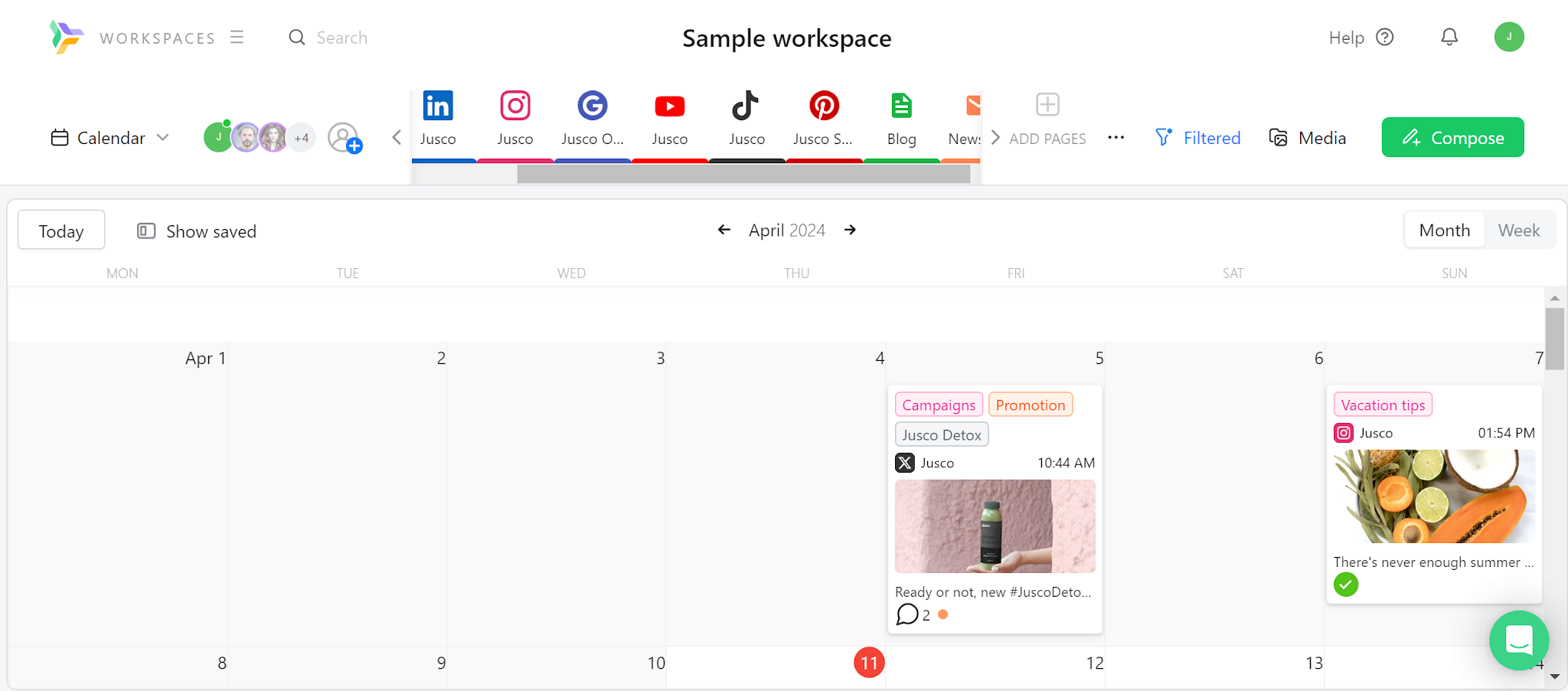
I'd say that they have one of the better user experiences out of most alternatives because of how quickly you can get to any feature in 1-2 clicks.
They also offer features to plan your blog posts and newsletters in the same place as your social posts, although I think most companies won't use those features because they'll already have software for those use cases.
One thing I'd note that it's lacking is a feature for curating content. They do offer GIFs, but I couldn't find any other form of media that comes with the platform.
Pros
- Visual content previews for every platform
- Real-time commenting and collaboration
- Fast, intuitive interface for teams and clients
- Multi-step approval workflows (Pro plan)
- AI tools for writing and editing captions
Cons
- No built-in stock media or content discovery library
- Analytics, social inbox, and social listening are offered as paid add-ons.
- Doesn’t offer automated post recycling
- Can't publish to X on the free plan
Key features
- Post Composer – Create grouped posts across multiple platforms, edit visuals, and customize for each channel from one place.
- Visual Calendar – Plan, drag-and-drop, and organize content with color-coded labels and campaign filters
- Approval Workflows – Assign roles, manage permissions, and build multi-step approval flows with shareable links for stakeholders.
- Internal Collaboration – Leave comments, annotations, and suggested edits with full version history and resolution tracking
- Universal Content – Draft, format, and collaborate on non-social content like blog posts, newsletters, and creative briefs
- AI Tools – Generate captions, rewrite posts, suggest hashtags, and repurpose content using built-in AI tools
- Scheduling Tools – Schedule posts, Stories, Reels, Carousels, and recurring content with support for first comments, location, alt text, and tags
- Grid Preview – Drag and drop posts to visually plan and align your Instagram feed layout
- Media Library – Centralize all visuals, reuse posts, and integrate directly with Canva for asset design.
- Social Inbox – Monitor and respond to comments and messages across platforms, and organize them by status and sentiment (offered as a paid add-on).
- Analytics & Reporting – Track engagement, audience demographics, and top-performing content with shareable PDF or link-based reports (offered as a paid add-on).
- Mobile App – Review, approve, schedule, and get notified on the go with an iOS and Android app.
Why is Planable good for scaling agencies?
Faster, more visual approval workflow than Hootsuite for agency-client review. Content goes from idea to client sign-off in 1-2 clicks with real-time commenting and shareable approval links (analytics is a paid add-on).
Pricing
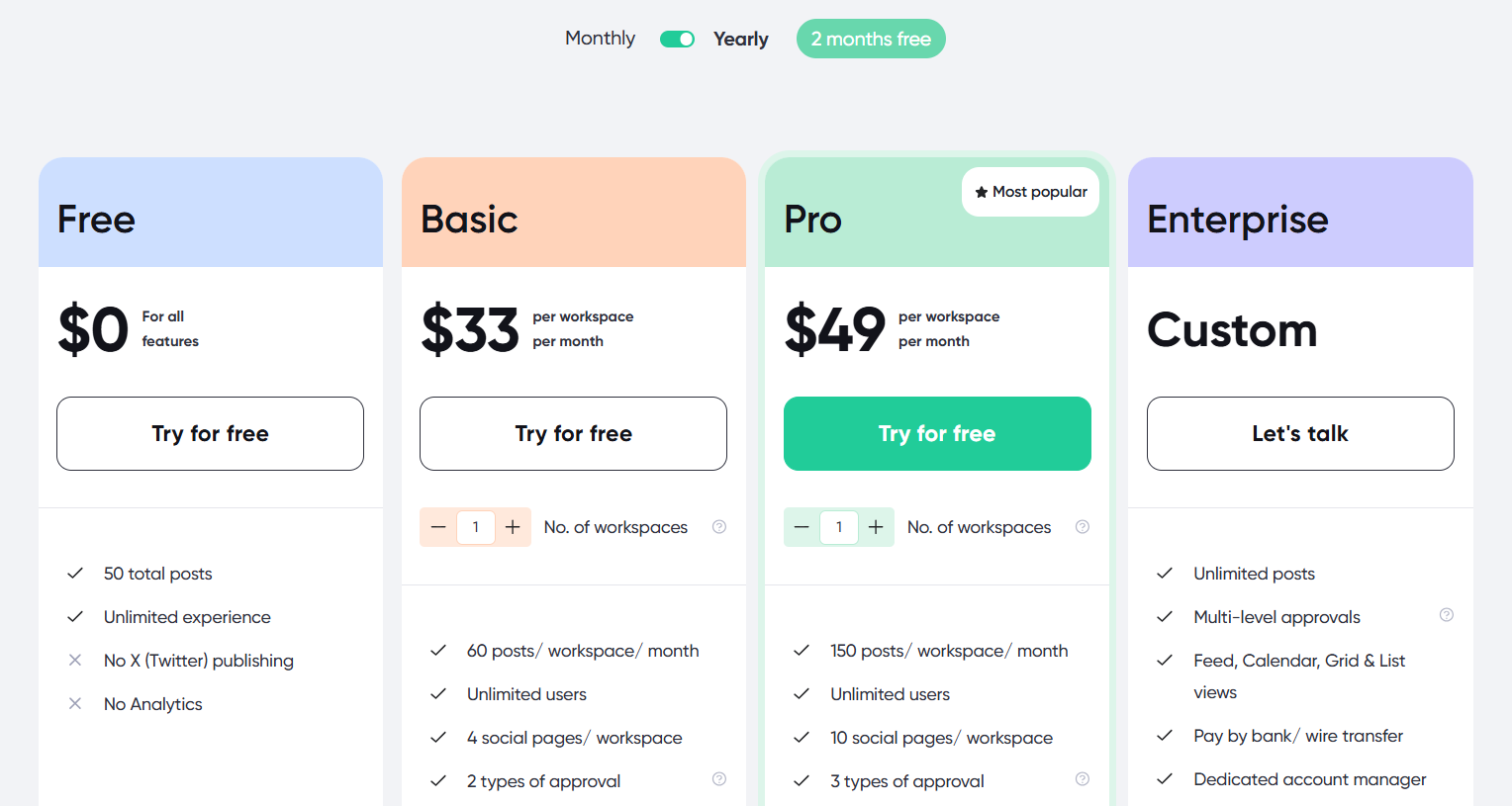
Planable offers 4 main pricing plans that scale based on the number of workspaces and users you need.
- Free - Create and schedule 50 total posts (no X publishing or analytics). You don’t need a credit card to get started, and there’s no time limit for those 50 posts.
- Basic - $33/month per workspace paid annually (60 posts/workspace/month)
- Pro - $49/month per workspace paid annually (150 posts/workspace/month)
- Enterprise - Contact Planable for custom pricing
Planable also provides the following paid add-ons:
Analytics: $12/workspace/month
Social inbox: $7.5/workspace/month
Social listening: $82.5/workspace/month
I recommend checking out Planable's pricing page for more details.
Customer reviews
Planable holds a 4.6-star average on G2 from 1,100+ reviews. Users commonly praise its collaboration abilities and its simplicity. Meanwhile, one common thing reviewers criticize is its lack of reporting abilities.
Here's what Alicia S. has to say about using Planable:
"What do you like best about Planable?
It's easy to use, easy to pause when there is a lull in my business, and most importantly: My clients LOVE the layout and find it super easy to use for approval and making comments on posts. I will continue using it, as it has saved me from receiving 300 emails back and forth for changes, and instead I can just get an approval right in the app and schedule it right away.
What do you dislike about Planable?
I would say the only downside is that I can't try out the different add-ons without being charged for them, so I don't actually know if they're useful for my clients or not. I have just chosen not to use them because of this."
9. Good choice for enterprises: SocialPilot
SocialPilot is an all-in-one social media management app that's made for larger enterprises.
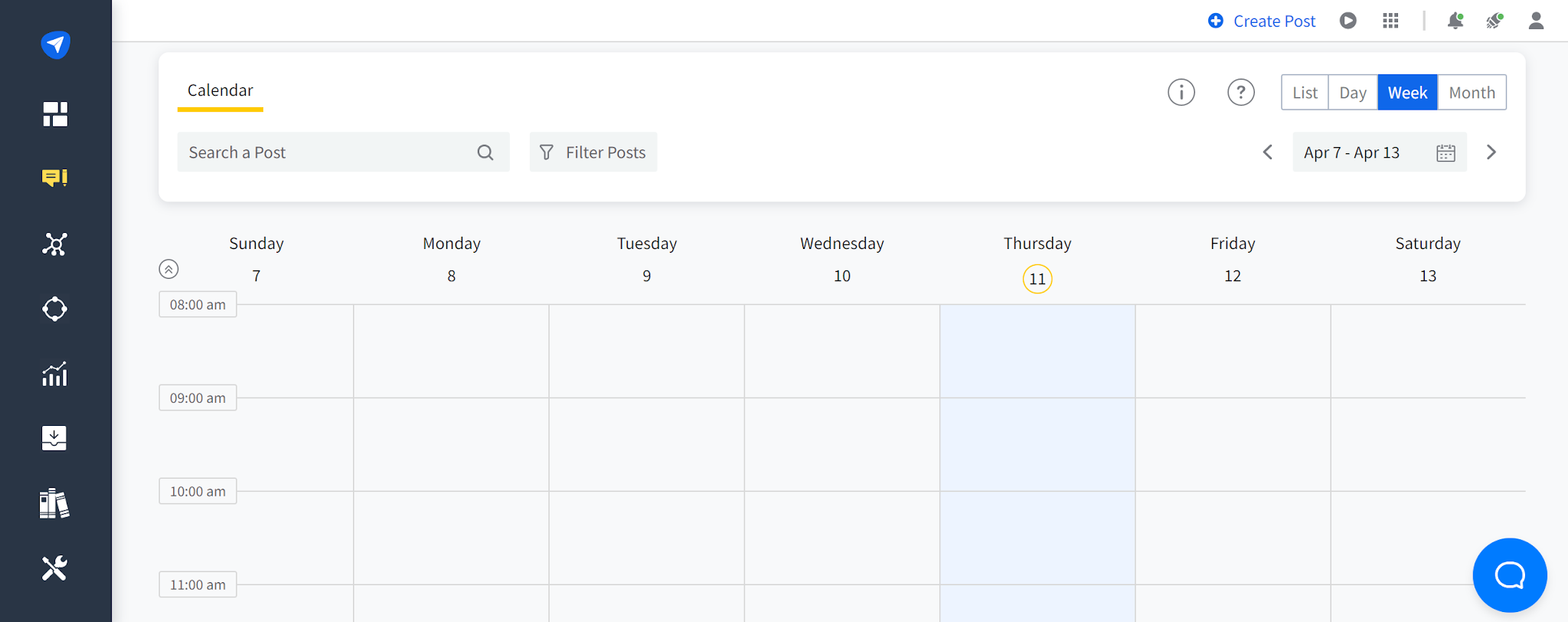
You can schedule posts on all the most important social media platforms, like X, Facebook, Instagram, YouTube, Pinterest, TikTok, LinkedIn, and Google Business.
Plus, you get unique white-label features to manage, collaborate, and share analytics with clients.
If you manage a lot of social media accounts, SocialPilot's pricing is reasonable. However, if you manage only a few accounts, there are more affordable options (like Post Planner).
Pros
- Supports all of the most popular social media platforms
- Great if you have a lot of social media accounts to manage
- Easy to optimize your posts for each platform
- White-label customization features
- Team collaboration features
- Manage your social media inboxes from a single place.
Cons
- More complex user experience compared to alternatives
- 16 supported integrations with productivity tools, which is considerably fewer than the integrations that you get with competitors like Hootsuite.
- No free plan
Key features
- Scheduler – Plan and publish content across Instagram, Facebook, TikTok, LinkedIn, YouTube, Threads, X, Pinterest, Google Business, and Bluesky from one dashboard
- AI Pilot – Generate ideas, repurpose content, rewrite captions, and bulk schedule directly from ChatGPT with SocialPilot’s AI Scheduler.
- Calendar – Visualize and manage campaigns with a drag-and-drop planner, tags, drafts, approval stages, and shareable views for clients.
- Bulk Scheduling – Upload up to 500 posts via CSV and assign them to accounts, time slots, and campaigns in one step.
- Content Library – Save and organize hashtags, evergreen content, branded visuals, and campaign templates for reuse.
- Inbox – Respond to all social DMs, mentions, and comments from a single inbox, with tags, notes, account grouping, and AI reply refinement.
- Collaboration – Assign roles (Admin, Manager, Content Scheduler), collaborate on drafts, tag teammates, and get post approvals with comment threads.
- Analytics – View post, account, and campaign performance across platforms with custom dashboards and local time zone tracking.
- Advanced Reports – Drag and drop custom reports, add text/images for context, and schedule automated delivery with secure links.
- White Label – Customize platform UI, login pages, domains, and email reports with your branding (white-label reports from Premium, full white label on Ultimate).
Why is SocialPilot a good choice for enterprises?
Reasonably priced for teams managing large account volumes. Bulk CSV scheduling and white-label reporting make it practical for enterprises managing many accounts, though it supports fewer integrations (16) than Hootsuite.
Pricing
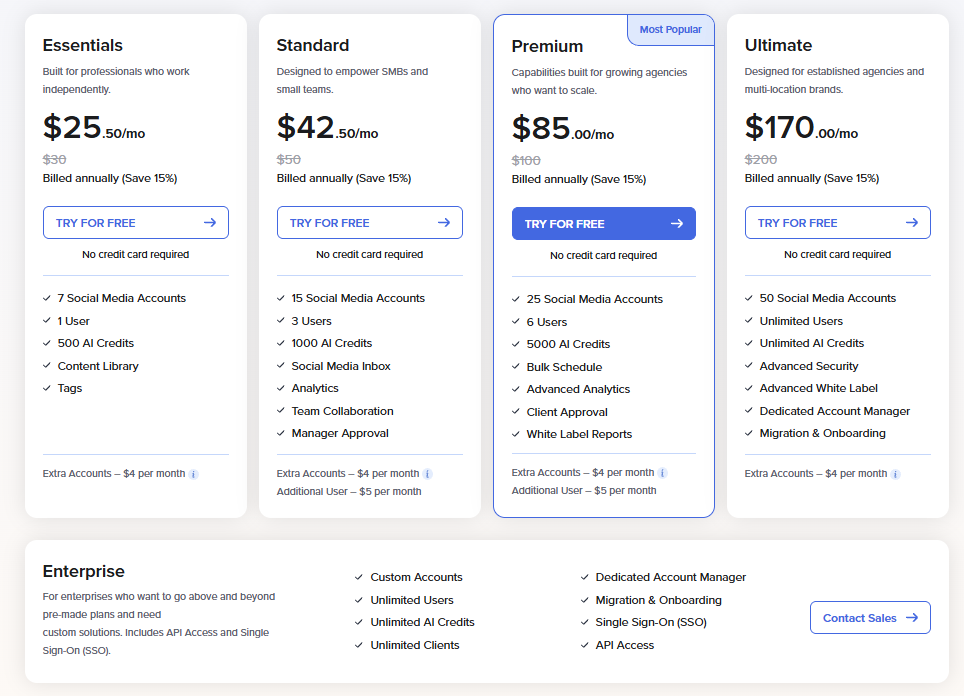
SocialPilot offers 5 main pricing plans:
- Essentials - $25.50/month, billed annually for 1 user and 7 accounts. You can add extra accounts for $4/month.
- Standard - $42.50/month, billed annually for 3 users and 15 accounts. You can add extra accounts for $4/month and an additional user for $5/month.
- Premium - $85/month, billed annually for 6 users and 25 accounts. You can add extra accounts for $4/month and an additional user for $5/month.
- Ultimate - $170/month, billed annually for unlimited users and 50 accounts. You can add extra accounts for $4/month.
- Enterprise - Custom pricing for custom accounts and unlimited users.
I recommend checking out SocialPilot's pricing page for more details.
Customer reviews
SocialPilot holds a 4.5-star average on G2 from 840+ reviews. Customers love the value you get for the price, especially if they manage a lot of accounts. Finding many complaints was a struggle, although some mentioned occasional scheduling errors.
Here's what Katie F. has to say about using SocialPilot:
“What do you like best about SocialPilot?
I like how SocialPilot saves us the hassle of going into each platform individually to schedule posts by putting everything on one platform for us. It also saves us time since we don't have to schedule posts manually on different platforms, and it allows us to automatically publish blogs, which is great for getting more mileage out of the content we're already creating. I appreciate its simplicity, even though it hasn't evolved much over the years, and the fact that it alerts us when platforms are down has been a good experience. The initial setup was super easy, making it really easy to connect new profiles. It’s also very simplistic and intuitive.
What do you dislike about SocialPilot?
It's pretty bare-bones compared to some of the bigger competitors in the industry. It hasn't really evolved much since we started using it a few years ago.”
10. Most similar features to Hootsuite: Agorapulse
Agorapulse is another all-in-one social media management platform that comes with advanced features that other social media schedulers don't usually have.
In addition to being able to schedule posts on Facebook, Instagram, Threads, X, LinkedIn, YouTube, Pinterest, Google Business, TikTok, Bluesky, and Reddit, you get tools to manage your inboxes and track brand mentions.
Agorapulse got rid of its free plan, but they do offer a 30-day free trial instead.
Because of its advanced features, its pricing is less affordable for small businesses. But it's still reasonably priced for what you get compared to other alternatives with similar features.
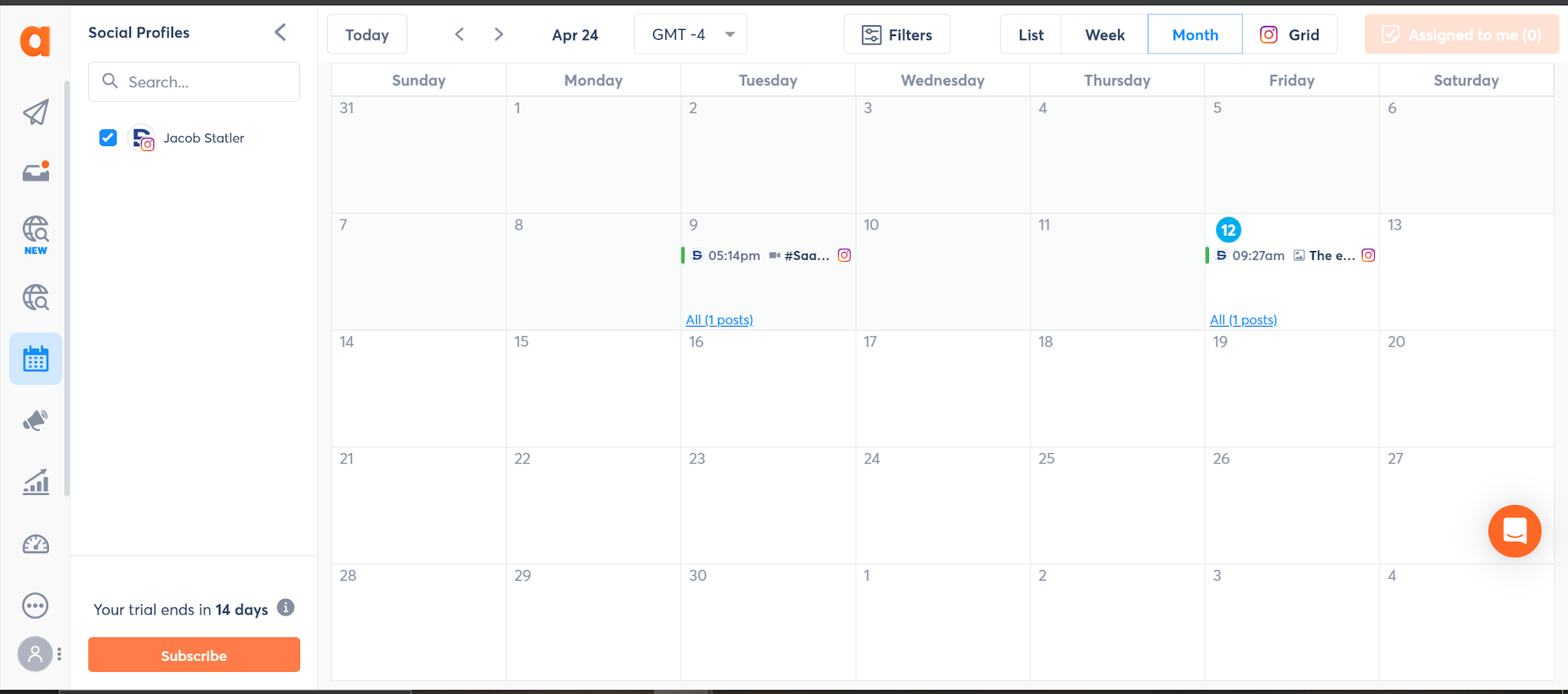
I also did find the user experience to be pretty easy to navigate, given the number of advanced features Agorapulse has.
Pros
- Unlimited post scheduling on all plans
- Helpful customer support
- Makes social listening easy
- Can respond to comments from the platform
- Offers an employee advocacy feature that helps boost your reach
- Advanced reporting that tracks social analytics & your team's engagement
Cons
- No free plan beyond a 30-day trial.
- You can't curate high-performing content from around the web.
- The paid plans start at $79/month paid annually, which is high compared to Post Planner.
- Charges per user (can get expensive fast for teams)
- You'll have to buy one of the higher-tier paid plans for more advanced features like bulk scheduling.
Key features
- Publishing – Schedule and auto-publish content across Instagram, Facebook, TikTok, LinkedIn, YouTube, Threads, Bluesky, Google Business, Pinterest, and X.
- Shared Calendars – View and manage scheduled, published, pending, and rejected posts with clients or teammates.
- Writing Assistant – Rewrite captions, apply tone/style filters, and generate AI-enhanced copy directly in the post composer.
- Inbox Assistant – Consolidate messages, comments, mentions, and reviews from all platforms with saved replies, auto-labels, and assignments.
- Monitoring – Track brand mentions, hashtags, and keywords across social, news, blogs, and forums with real-time alerts and sentiment analysis.
- Advocacy – Launch employee or influencer campaigns with pre-approved copy, segments, and multi-version content sharing.
- ROI Reporting – Attribute traffic, leads, and revenue to posts and conversations without needing to touch Google Analytics.
- Reporting – Analyze post and team performance, track replies and moderation metrics, and export customizable reports.
- Link in Bio – Build branded link pages with clickable grids to drive traffic from Instagram and other platforms.
Why is Agorapulse the most similar to Hootsuite?
It matches Hootsuite's core toolkit (inbox, social listening, employee advocacy, ROI reporting) in one platform, which makes it the most direct swap. It is priced per user, so costs climb at scale the same way.
Pricing
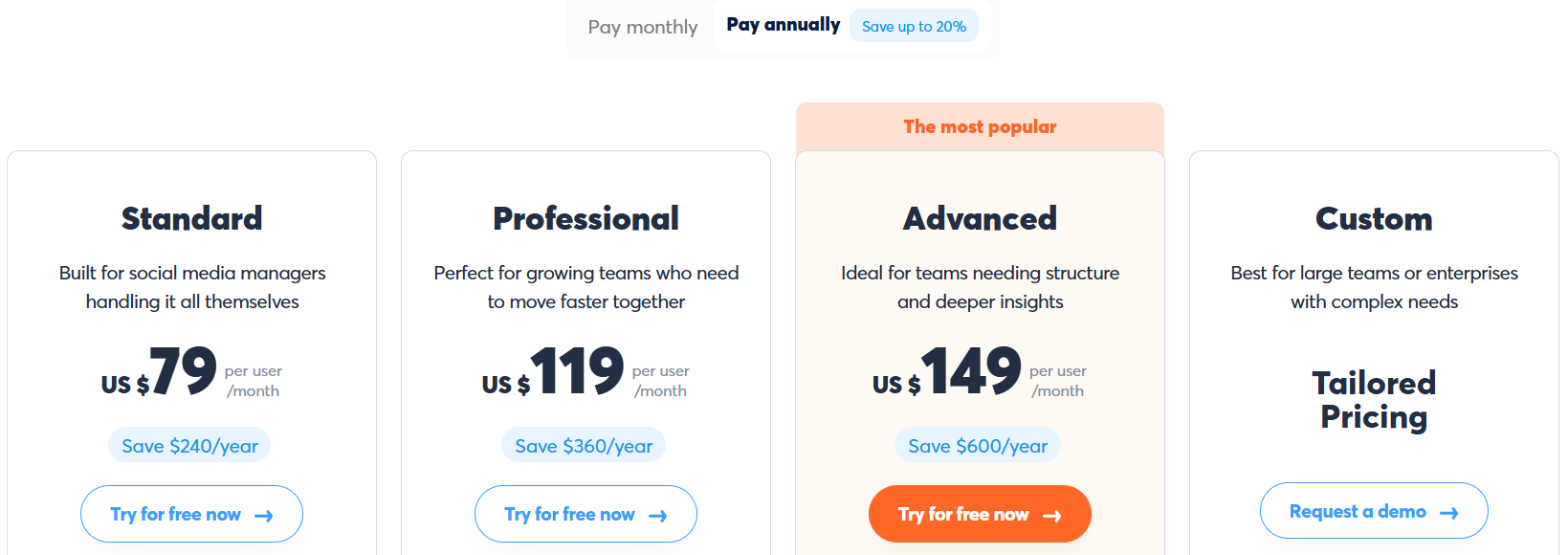
Agorapulse has 4 main pricing plans and a 30-day free trial:
- Standard - $79 per user/month billed annually
- Professional - $119 per user/month billed annually
- Advanced - $149 per user/month billed annually
- Custom - Contact Agorapulse for pricing
I recommend checking out Agorapulse's pricing page for more details.
Customer reviews
Agorapulse holds a 4.5-star average on G2 from 970+ reviews. Customers like being able to manage all of their social media DMs in one place and the ability to track brand mentions across social platforms. One of the most common criticisms is the high price point for smaller businesses.
Here's what Tatiana D. has to say about using Agorapulse:
“What do you like best about Agorapulse?
I like how the inbox system is set up in Agorapulse. It's easy to track what has been replied to and what still needs attention, which helps me to stay organized throughout the day. When dealing with a high volume of interactions, having that kind of structure really makes a difference. I also love the speed and efficiency of how quickly replies are sent out. It keeps me on a fast reading pace and doesn't slow me down.
What do you dislike about Agorapulse?
It takes a while for the system to show how many comments I've done, and I normally have to wait, like, four hours. Sometimes the amount that is being displayed is not accurate.”
11. Best for advanced analytics: Sprout Social
If your company has outgrown Hootsuite’s analytics, Sprout Social offers everything you’ve been missing — though at a higher price point.
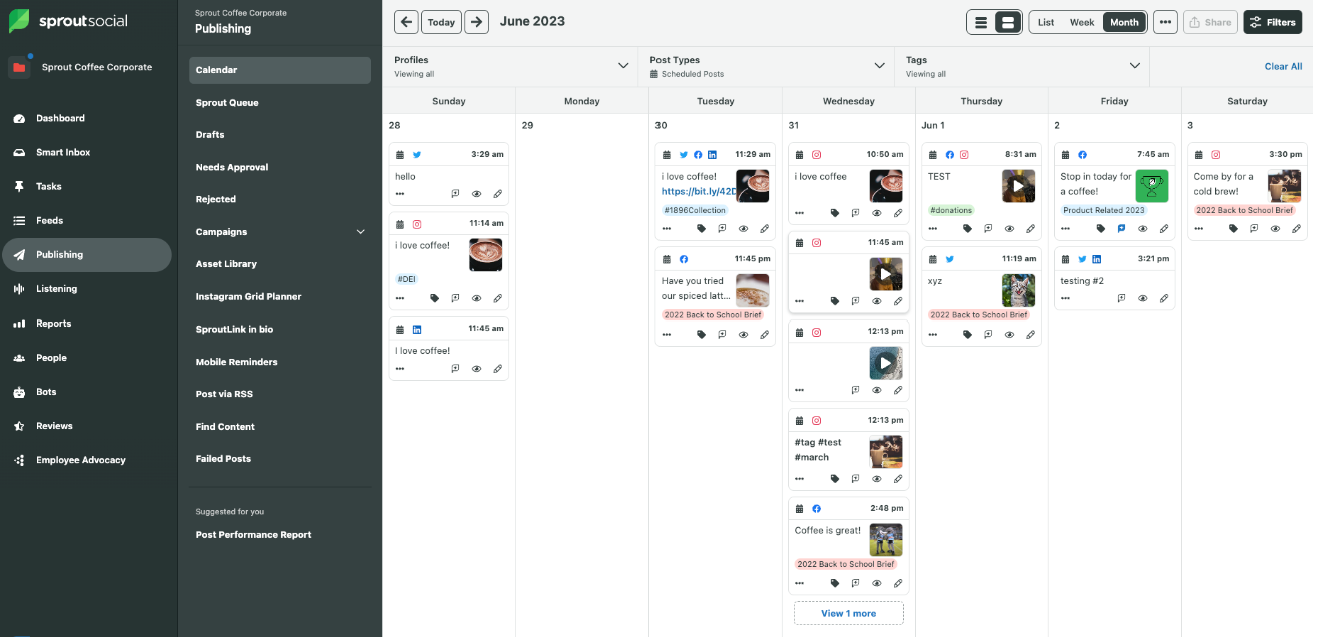
I recommend Sprout Social for teams that need advanced reporting, collaboration tools, and a unified inbox for managing engagement at scale.
It’s packed with automation features and AI insights that help you optimize campaigns, track ROI, and prove the value of social media to clients.
Pros
- Enterprise-grade analytics and customizable reports
- Unified social inbox for messages, mentions, and comments
- Team collaboration and approval workflows
- AI tools for caption writing and performance analysis
- Integrates with CRM and helpdesk tools
Cons
- More expensive than most Hootsuite alternatives
- Social Listening, Premium Analytics, and Employee Advocacy are not included in the regular plans and are only available as paid add-ons.
- Steeper learning curve for new users
- Standard and up are billed annually only. Essentials is the one plan you can pay monthly ($99 per seat).
- Overkill for solo creators or small businesses
Key features
- Publishing – Schedule and optimize posts across platforms (Instagram, Facebook, LinkedIn, Bluesky, Pinterest, Threads, TikTok, X, and YouTube) using a central calendar, with support for Stories, Reels, Carousels, and more
- AI Content Suggestions – Generate alt text, rewrite captions, and get post ideas using Sprout’s AI Assist tools.
- Optimal Send Times – Automatically select the best time to publish based on your audience's engagement history.
- Link in Bio (SproutLink) – Build a visual landing page to turn your Instagram bio into a traffic driver with clickable content grids.
- Social Listening – Track millions of conversations in real time, including sentiment, influencer mentions, and share of voice.
- Engagement Tools – Use smart inboxes, spike alerts, and AI-recommended replies to manage customer messages and brand reputation.
- Review Management – Respond to and analyze reviews from Google, Yelp, Apple App Store, and more in one place.
- Analytics & Reports – Build custom dashboards with filters, comparison views, tag reports, and network-level insights.
- Premium Analytics – Add advanced filtering, AI-powered insights, and dynamic stakeholder reporting with shareable links.
- Employee Advocacy – Let staff share brand-approved content, track earned media value, and expand reach through personal networks.
- Influencer Marketing – Discover creators by topic, vet for brand safety, and manage contracts, content, and reporting in one hub.
Why is Sprout Social the best for advanced analytics?
Positioned as the analytics upgrade from Hootsuite, with deeper reporting and AI insights at a higher price point. Premium Analytics and data-driven send times go further than most competitors' built-in dashboards.
Pricing
Sprout Social has 5 main pricing plans with a 30-day free trial (no credit card required):
- Essentials - $79/month per seat for up to 5 social profiles paid annually.
- Standard - $199/month per seat paid annually
- Professional - $299/month per seat paid annually
- Advanced - $399/month per seat paid annually.
- Enterprise - Contact Sprout Social for pricing
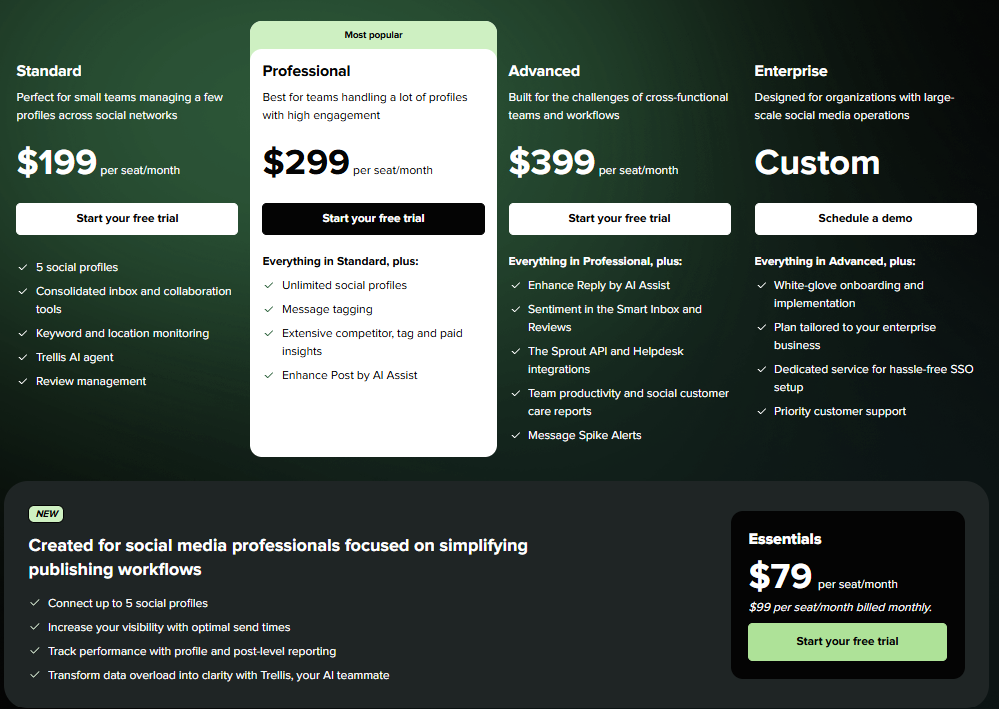
Sprout Social also provides Social Insights (Premium Analytics and Listening), Employee Advocacy, and Professional Services as add-ons. All users receive a monthly allowance of 100 Trellis (Sprout Social’s AI agent) credits included in their base plan.
Check out Sprout Social's pricing page for more details.
Customer reviews
Since Sprout Social was one of the first social media management tools, it has collected thousands of online reviews. It holds a 4.4-star average on G2 from 6,800+ reviews. Customers love that it's loaded with plenty of advanced features like the Smart Inbox and reports. The high cost is one of the few dislikes some customers mention.
Here's what Madison W. has to say about using Sprout Social:
"What do you like best about Sprout Social?
I love the note feature and the ability to review analytics based on specific tags. The workflow option is also awesome. Sprout Social really helps us keep our content organized in one place where our whole team can see it, so we are always on the same page. The initial setup was very easy, and it's really working well for us—I'd rate it an 8 out of 10.
What do you dislike about Sprout Social?
While the workflow option in Sprout Social is a great touch, it feels a little clunky. The literal flow could be smoother for external approvers to better manage C-suite socials. Also, the inability to auto-resize graphics from platform to platform is inconvenient, as it requires creating separate graphics for each post across Facebook, Instagram, and LinkedIn. Additionally, I felt the onboarding process was a bit overwhelming."
12. Best for AI-powered scheduling and analytics: Vista Social
If you want a modern Hootsuite alternative with smarter AI automation and a friendlier price, Vista Social should be near the top of your list.
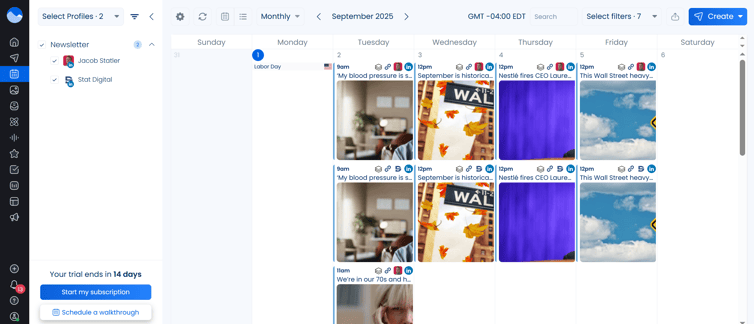
It’s ideal for teams managing multiple brands or clients. The unified inbox, post-level approvals, and customizable reports make it easy to collaborate without losing control of content quality.
Vista Social stands out for its clean interface, flexible pricing, and support for emerging platforms like Threads and YouTube Shorts, making it a future-proof choice for growing teams.
Pros
- Extremely affordable compared to Hootsuite
- AI-powered post writing and optimization
- Supports 13 platforms (including Tumblr and Snapchat)
- Smart analytics and competitor insights
- Easy-to-use interface with clean visuals
Cons
- Slight learning curve for new users
- No built-in design studio
- Occasional delays when uploading large media batches
Key features
- AI-Powered Publishing – Generate posts using Vista’s built-in AI assistant, powered by ChatGPT, with caption prompts, content repurposing, and tone matching
- Multi-platform scheduling – Post to Instagram, Facebook, TikTok, LinkedIn, Pinterest, YouTube, Threads, Bluesky, Reddit, Snapchat, Tumblr & Google Business. To schedule to X, you need Vista Social’s paid add-on at $29/month, available on every pricing plan.
- Automated DMs & comment replies – Set triggers to auto-respond to keywords, mentions, or comments with personalized messages, links, or offers.
- Smart Inbox – Respond to all comments, messages, mentions, and reviews from one unified dashboard
- Social Listening – Track keywords across social networks, review sites, blogs, and news sources, with sentiment analysis and influencer recognition
- Advanced Reporting – Customizable, exportable reports with cross-platform insights, post performance, sentiment, team productivity, and competitor benchmarks
- Employee Advocacy – Let teammates like, share, and comment using pre-approved content to boost reach organically and save on paid ads
- Vista Page (link in bio tool) – Build landing pages and mini-sites with lead gen tools, scheduling, payments, video embeds, and custom domains
- Vista MCP – Vista MCP plugs into Cursor, ChatGPT, Claude Desktop, and more, exposing tools for scheduling, inbox, analytics, ideas, media, and reporting, so your AI can do the work for you.
- Ask Vista – You can chat with Vista’s AI-powered command center to schedule, publish, engage, and report. You can also deploy agents that work on a schedule and run skills that execute multi-step expert workflows.
- Review Management – Monitor and respond to reviews across Google, Facebook, Yelp, TrustPilot, OpenTable, and TripAdvisor.
- Media integrations – Use Canva, Dropbox, GIPHY, Pexels, Unsplash, and more directly within Vista’s content library.
Why is Vista Social the best for AI-powered scheduling and analytics?
Cheaper and more AI-forward than Hootsuite. Ask Vista and Vista MCP let AI handle scheduling, inbox management, and reporting directly, a level of AI-native automation none of the other tools on this list match.
Pricing
Vista Social offers 3 flexible plans, and you can access every plan with a 14-day free trial (no cc required):
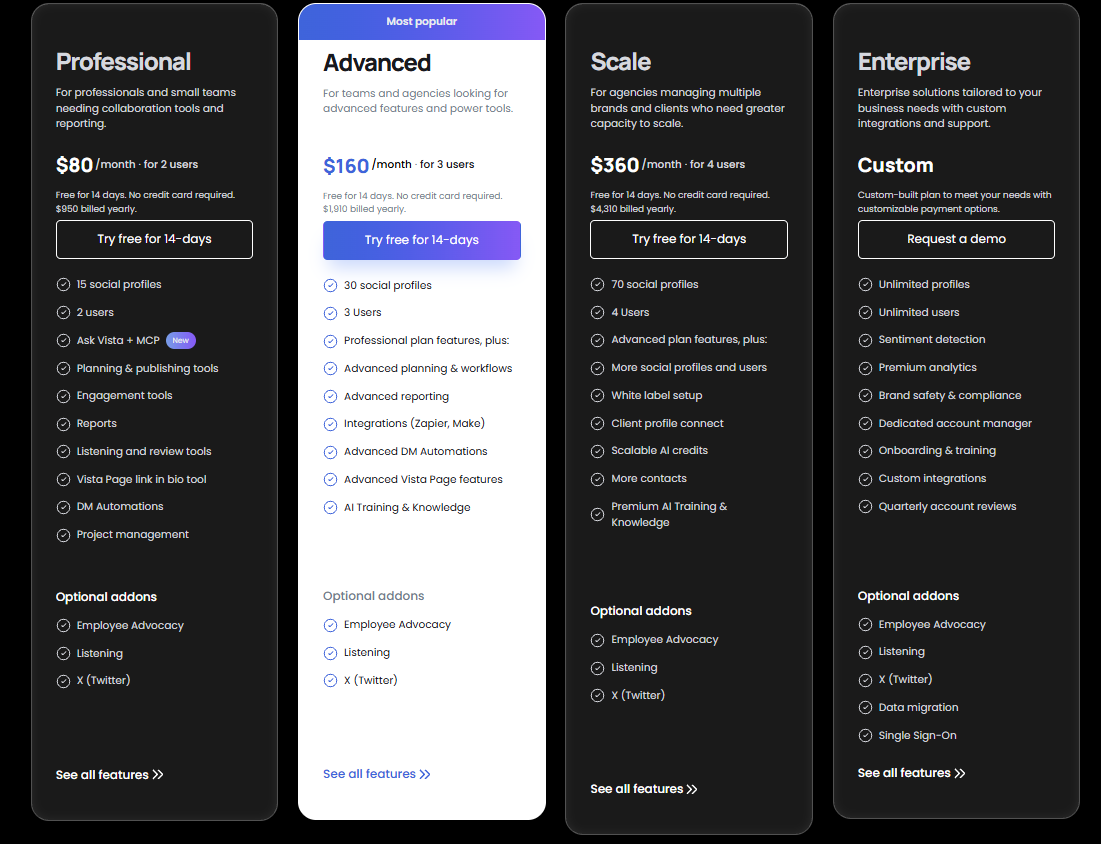
- Professional – $80/month, billed annually for 15 social profiles and 2 users with 1000 AI credits/month.
- Advanced – $160/month, billed annually for 30 social profiles and 3 users with 2000 AI credits/month.
- Scale – $360/month, billed annually for 70 social profiles and 4 users with 3500 AI credits/month.
- Enterprise – Custom pricing for large teams needing unlimited profiles, 8+ users, and unlimited AI credits/month.
Add-ons:
- Employee Advocacy – Free to try, then $199/month for up to 25 employees
- Social Listening – $75/month to monitor social, web, and news outside your own profiles.
- X(Twitter) – $29/month for publishing, boosting, automations, and analytics.
Check out Vista Social's pricing page for more details.
Customer reviews
Vista Social has a 4.8/5 average from over 1,000 reviews on G2. Users praise its fast UI, unified inbox, content scheduling, and time-saving automations. Many reviewers highlight how it combines social listening, publishing, analytics, and DM automation into one intuitive platform.
Here’s what Joshua A. has to say:
“What do you like best about Vista Social?
Vista Social has proven very easy to use, and whenever we do have an issue, the support team has always been able to help us quickly. We've tried other scheduling platforms, but Vista Social is by far the best.
It's been perfect for us to integrate with LinkedIn, Instagram, Facebook, and YouTube - it's massively helped us scale our reach and improve marketing performance.
The return on investment has been manifold - I always recommend Vista Social to my community and anyone I meet who wants to post content more consistently.
What do you dislike about Vista Social?
There are caps on how often we can schedule/post - we post heavily though so it is understandable. Thankfully we've been able to at least schedule 50 posts a day per platform without issues, but no more than 50.”
Frequently asked questions about Hootsuite alternatives
Is Hootsuite free?
Hootsuite stopped offering its free plan after March 31st, 2023.
The good news is there are plenty of alternatives that still offer capable free plans (like Post Planner).
Why might someone want a Hootsuite alternative?
Hootsuite is loaded with valuable features, but it has become expensive for smaller businesses.
What is the best free Hootsuite alternative?
I recommend trying Post Planner's free plan. It allows up to 10 scheduled posts in the queue.
Get started with Post Planner for just $9/month
Post Planner offers great value to solopreneurs and SMBs — at an affordable price, including a free forever plan.
With Post Planner, you’ll have everything necessary to increase engagement, grow your accounts, curate content, post consistently, and report to clients.








No Comments