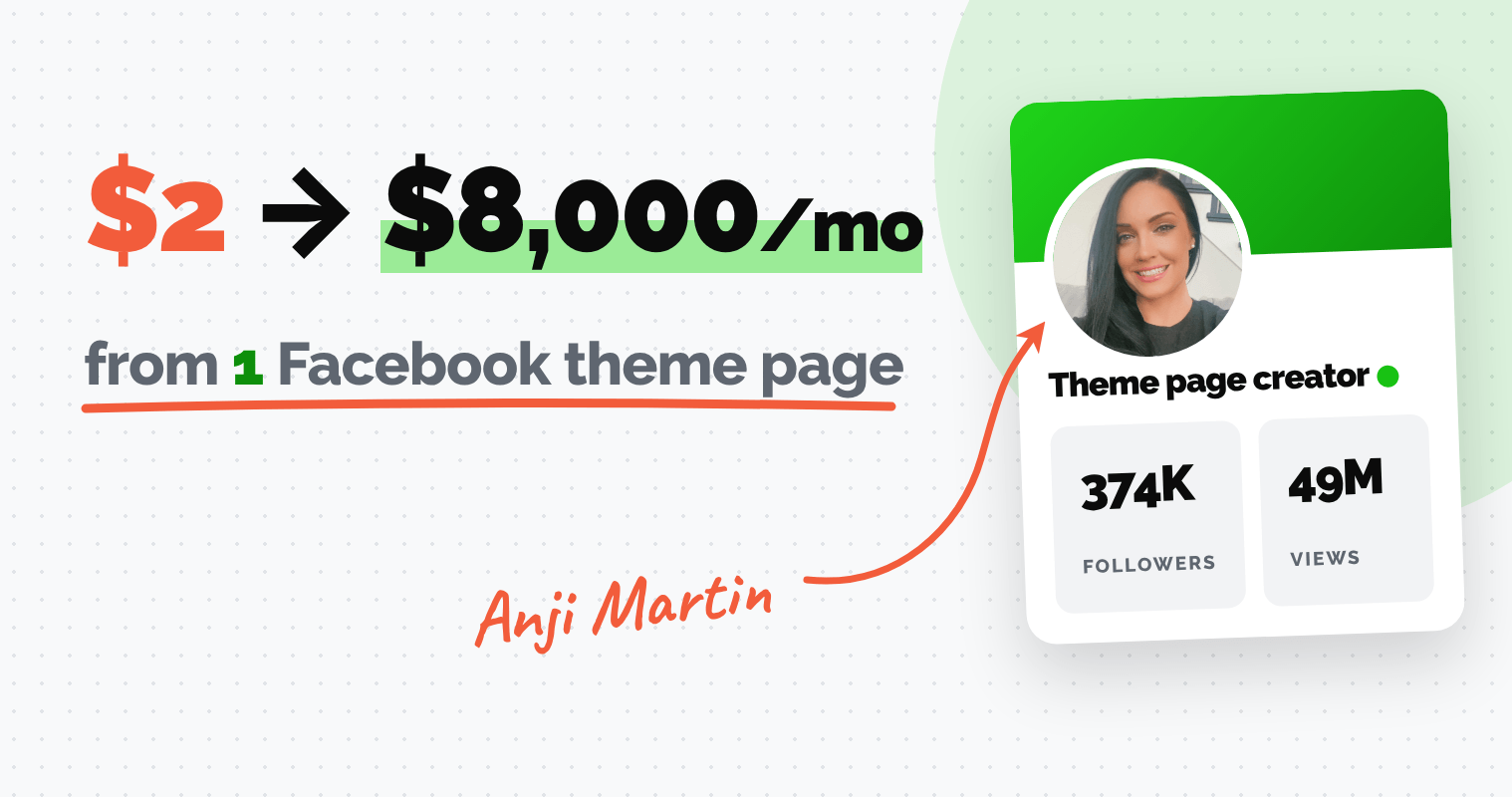
A couple of years ago, Anji Martin was spending almost every waking hour trying to grow her Facebook theme page.
She searched for ideas, created posts, and published everything manually.
And despite all that work, her page was barely growing.
“I was just randomly finding posts on Facebook... creating things with no rhyme or reason off the top of my head. Growth was very slow.”
Sound familiar?
If you're trying to grow a Facebook page, you know how exhausting it is to find content people actually engage with.
Especially when you're posting 6, 8, or even 10+ times a day.
And the worst part?
Spending MORE time creating posts doesn't necessarily mean you'll get more followers, engagement, or income.
Anji knew she needed a better system.
Today, she's grown her Facebook page from 3,000 to 374,000 followers, generated 49 million views in a single month, and built multiple income streams around her audience.
And she's doing it while spending just a few hours a week creating and scheduling content.
So how did she pull it off?
She built a repeatable 4-step system using Post Planner (including a clever way to get more mileage out of posts she'd already published).
Here's her story and how you can follow the same process.
Anji’s results at a glance
| Who | Anji Martin, Facebook theme page creator, YouTuber and mentor |
| Started with Post Planner | August 2024, about 3,000 followers |
| 90 days later | 100,000 followers |
| 7 months later | 320,000 followers |
| Today | 374,000 followers |
| Views | 49 million in a single month |
| Top post | 125,000+ Likes |
| Posting volume | About 18 posts a day |
| Income streams | Facebook payouts, affiliate offers, digital products, Etsy, own store, brand deals |
The $2 payout that changed everything
Anji's turning point came when Facebook paid her just $2 for an entire month of posting.
That $2 changed how she thought about her Facebook page.
“When I first saw that Facebook paid me $2 (just for posting) I realized I needed to take this seriously.”
There was an opportunity to turn her page into something MUCH bigger.
But first, she needed to figure out how to grow without spending her entire day creating and publishing posts.
That's when she discovered Post Planner through another creator on YouTube.
She'd tried Hootsuite years earlier but never stuck with it. This time, she wanted an easier way to find good content and schedule it ahead of time.
So she started using Post Planner in August 2024, when her Facebook page had around 3,000 followers.
Note: Everything in this article is about her theme page, a public Facebook page built around a topic (not her personal profile)
And within 90 days, she'd grown that page to 100,000 followers.
“I paid for this tool. I used it to get to 100,000 followers and then I reached out to the company to partner with them.”
Today, Anji is a Post Planner affiliate and paid partner, but her first 100,000 followers came BEFORE that relationship began.
She now teaches the exact system on her YouTube channel and inside her course, My Socials Pay.
And other Facebook creators can learn from the system she built.
Anji's 4-step system for growing a Facebook page
One of Anji's biggest lessons is that you can learn from what's ALREADY working.
“The biggest mistake that I see creators make is try to reinvent the wheel. Instead, we study what is already proven to work. So, you do not need to guess. We just observe.”
Anji calls this approach “social media leaves clues.”
She built her workflow around finding those clues, creating her own content, and posting consistently.
Here's how you can use the same 4-step system.
Step 1: Find posts that already went viral in your niche
Coming up with new Facebook post ideas every day can be EXHAUSTING.
Especially when you're publishing several times a day without knowing what will get engagement.
So Anji studies what's already working on other Facebook pages in her niche.
Instead of spending hours scrolling through Facebook, she uses Post Planner's Content Tool to find posts that have already earned thousands of Likes, comments, and shares.
Here's how you can do the same:
1. Open the “Content” tab in Post Planner.
2. Search for a topic related to your niche. For example, in one of her tutorials, Anji searches for “Christian news” to find content ideas for a Christian Facebook page.
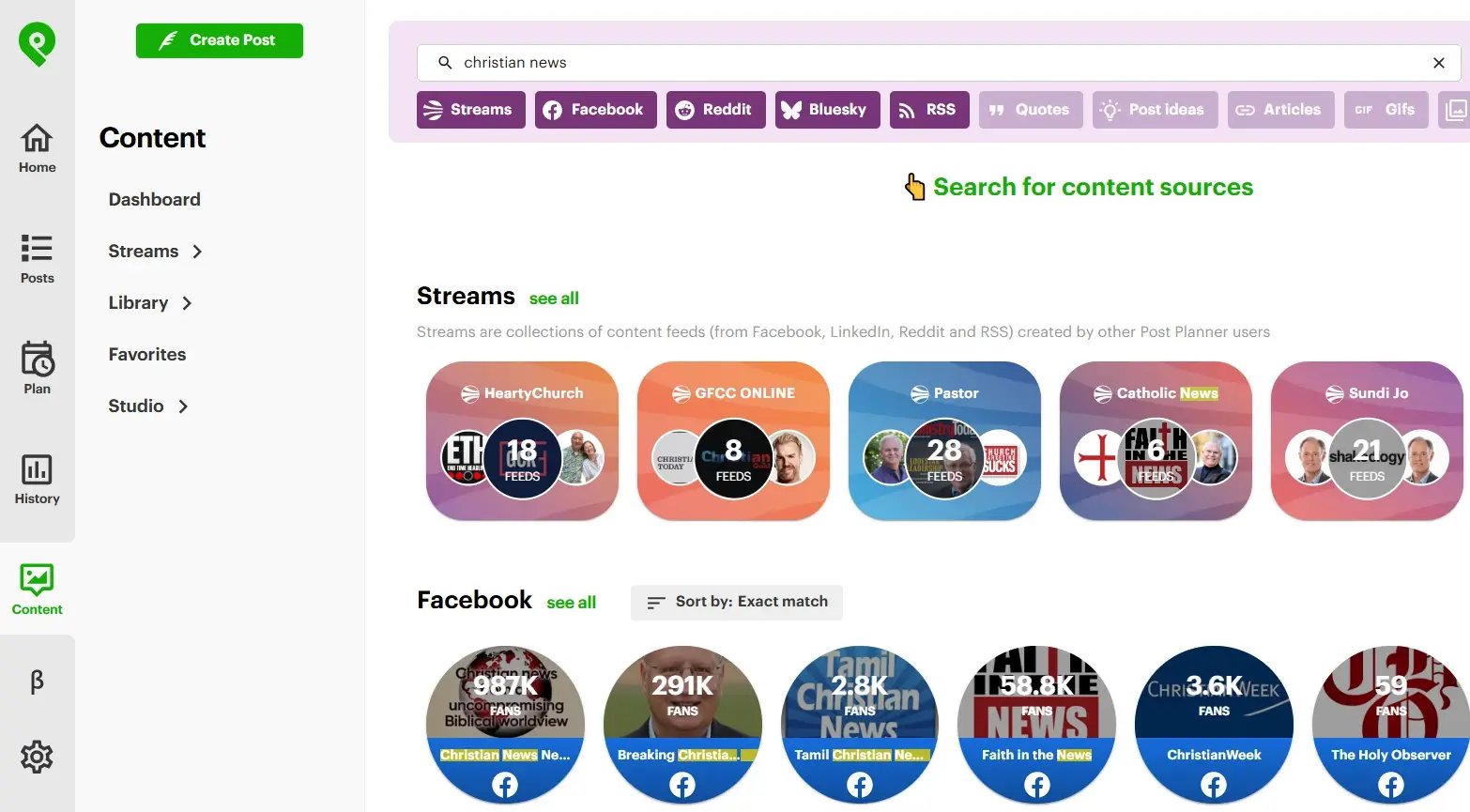
Search any topic in the Content tab to pull up ready-made Content Streams.
3. Explore the Content Streams, which are ready-made feeds of popular posts related to your topic.
4. Save Facebook pages that consistently publish engaging content. Anji keeps at least 10 favorites that she checks daily.
5. Sort a page's top-performing posts by time range to see which content has received the most engagement.
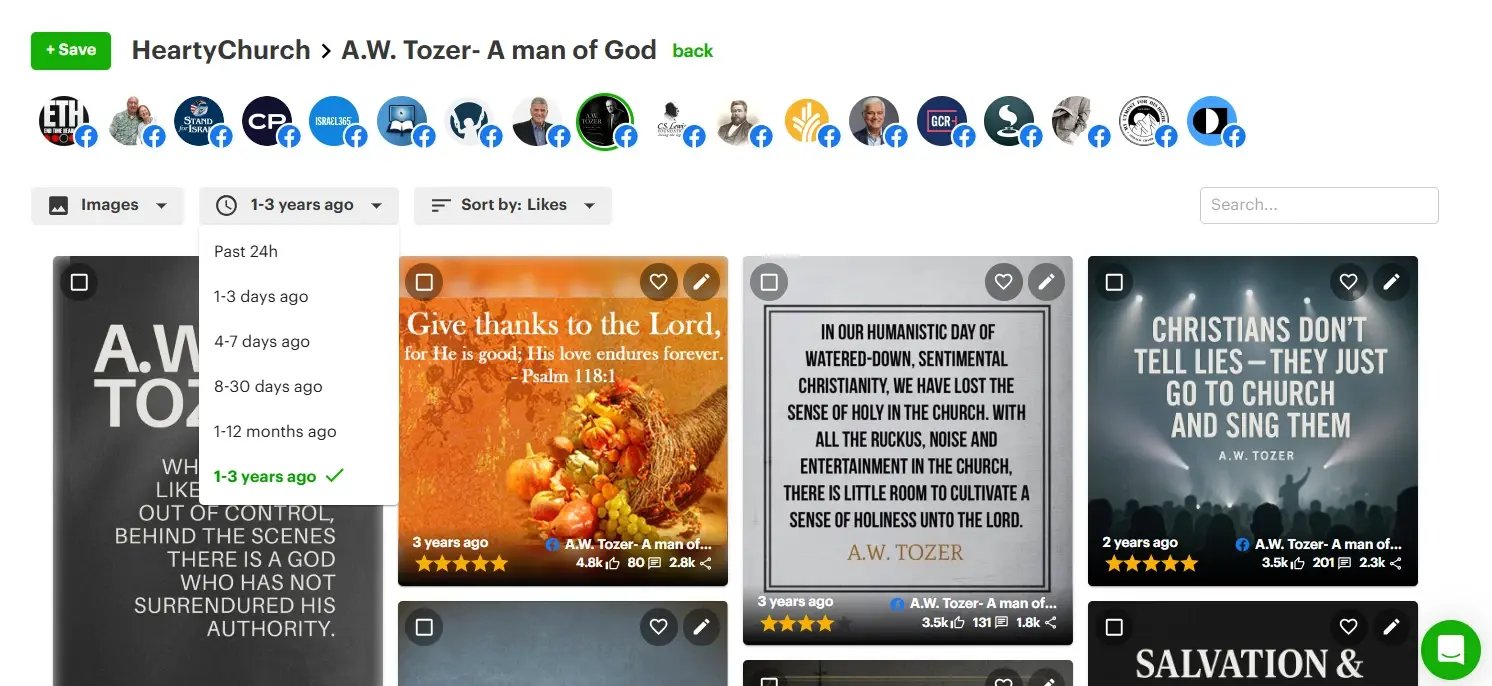
Sort a page’s top posts by Likes and filter by time range, all the way back to 1 to 3 years ago.
And here's where things get REALLY interesting.
Post Planner lets you look back at a page's best-performing content from the past 24 hours all the way to the last 3 years.
That means you can uncover GREAT posts buried years deep in someone's Facebook feed.
“There's no way you could ever scroll back 3 years on someone's page to find one of their posts that has 216,000 engagement.”
ANJI'S TIP: Don't limit your research to recent viral posts. Explore content from the past 1–3 years to find proven ideas you can put your own spin on.
Once you've found a few promising ideas, it's time to make them your own.
Step 2: Make each post your own with AI
Finding viral content is a great start.
But just because a post worked for another Facebook page doesn't mean you should copy and paste it onto yours.
Anji uses those posts as INSPIRATION for content that fits her audience.
And Post Planner's AI image generator helps her do it without spending hours designing everything from scratch.
For example, let's say you find a motivational quote image that's earned 50,000 Likes.
You could take inspiration from the topic, message, or visual style and create an original version that fits your page.
Here's how Anji uses Post Planner to do this:
1. Find a high-performing post in your niche using the Content Tool.
2. Open Post Planner's AI image generator and describe the image you want to create.
3. Generate your image and turn it into a new social media post.
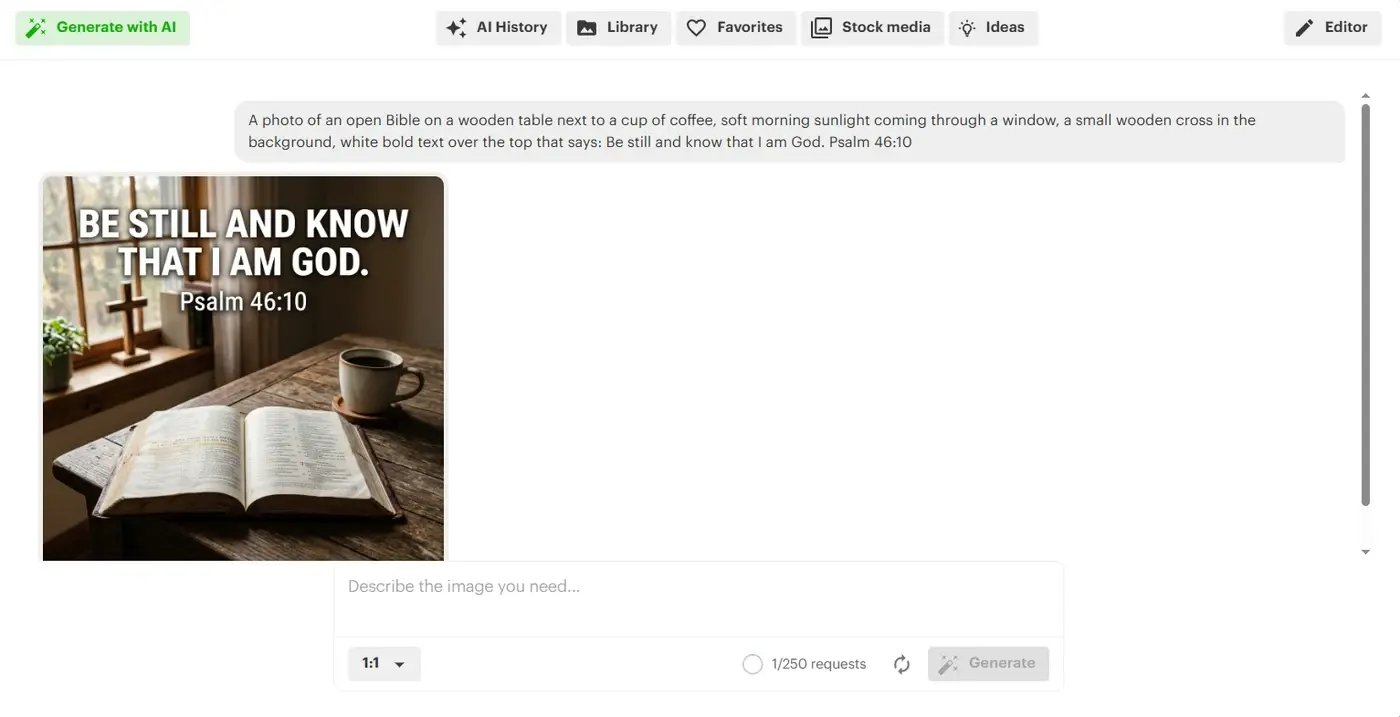
Describe the image you want and Post Planner generates it in seconds.
4. Write a caption that fits your audience (Anji also uses ChatGPT to help brainstorm caption ideas).
5. Select the Facebook page or other social media profiles you want to publish to.
The best part?
You can repeat this process with other topics and formats that already get engagement.
That means less time staring at a blank screen and more time making posts with a purpose.
ANJI'S TIP: Study what made a viral post successful, then put your own spin on it. As Anji explains, the goal is to “not copy but use it as inspiration.”
Step 3: Fill every time slot on autopilot
Posting 18 times a day sounds like a FULL-TIME job.
And if you're creating and publishing every post manually, it practically is.
Anji publishes about 18 posts a day while spending just a few hours a week preparing content.
Her secret?
She uses Post Planner's Posting Plans to automatically publish content throughout the day.
A Posting Plan is a weekly schedule of days and times for your Facebook posts.
Once you've set it up, Post Planner fills those time slots with posts from your queue.
So you can create a bunch of content in 1 sitting and let Post Planner publish it.
Here's how you can set up a similar system:
1. Open your Posting Plan in Post Planner.
2. Add the days and times you want your content to publish. Anji schedules posts throughout the day, leaving 12am to 5am Eastern open.
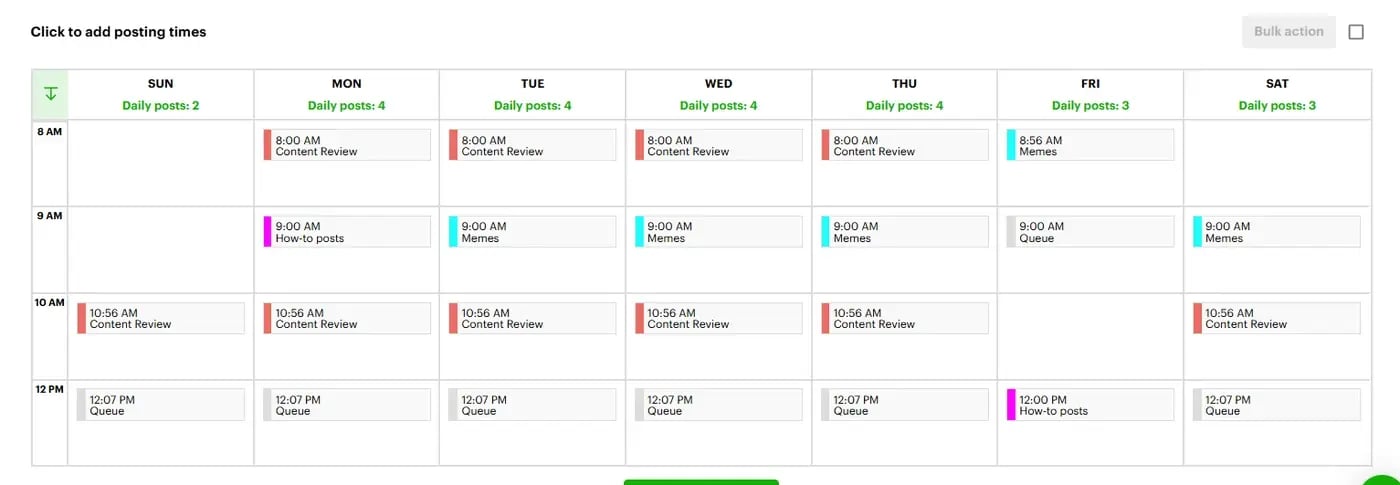
A Posting Plan is your weekly grid of time slots. Posts from your queue drop into the next open one.
3. Create several posts at once using the content you discovered and designed in Steps 1 and 2.
4. Add those posts to your queue, so Post Planner can publish them at your scheduled times.
5. Use Buckets to organize different types of content (like inspirational posts, tips, blog posts, or seasonal content) and rotate them throughout your schedule.
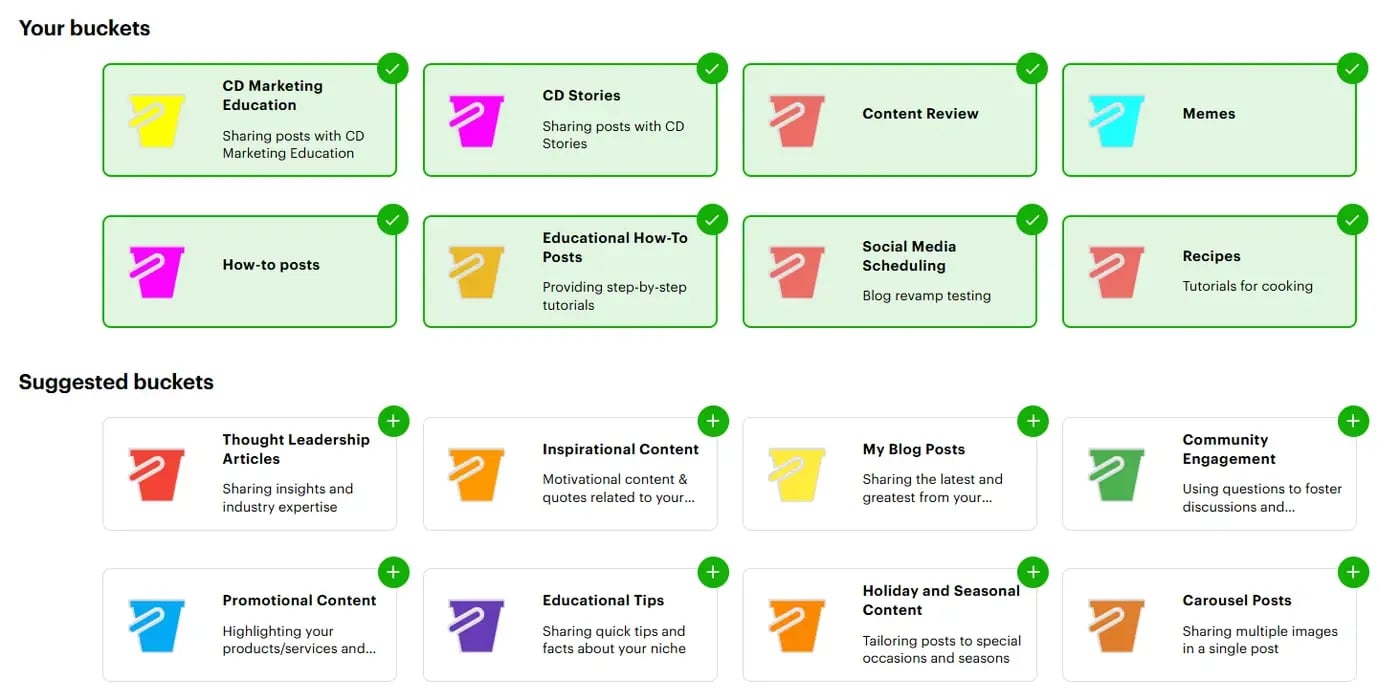
Buckets sort your posts by type so your schedule rotates through them.
And you don't have to start with 18 posts a day.
Start with 3–5 daily posts and add more as you learn what your audience likes.
The goal:
“I do not want you to be glued to your phone all day posting content. That is not freedom. We want a business where we can work a couple hours a week and then we can set it and forget it.”
ANJI'S TIP: Use the first comment on your Facebook posts to give interested followers a next step. Anji often links to blog posts that introduce relevant affiliate offers, helping turn engagement into potential income.
And there's another way to get MORE from the posts you've already made…
Step 4: Repost your best-performing content
What if some of your BEST future Facebook posts are ones you've already published?
Anji uses this strategy to keep her page active without constantly making new posts.
She finds her own past posts with the most engagement and schedules them again.
Why does this work?
Your newer followers may never have seen what you posted months (or years) ago.
Plus, Facebook can show your posts to people who don't follow your page yet, giving older content another chance to reach a completely new audience.
As Anji puts it:
“Great content deserves to be seen more than one time.”
Post Planner helps her find and repost those winners.
Here's how Anji does it:
1. Open Post Planner's Content tab and search for your own Facebook page.
2. Sort your past posts by engagement to find your top performers from the last 3 years.
3. Select several posts you want to publish again.
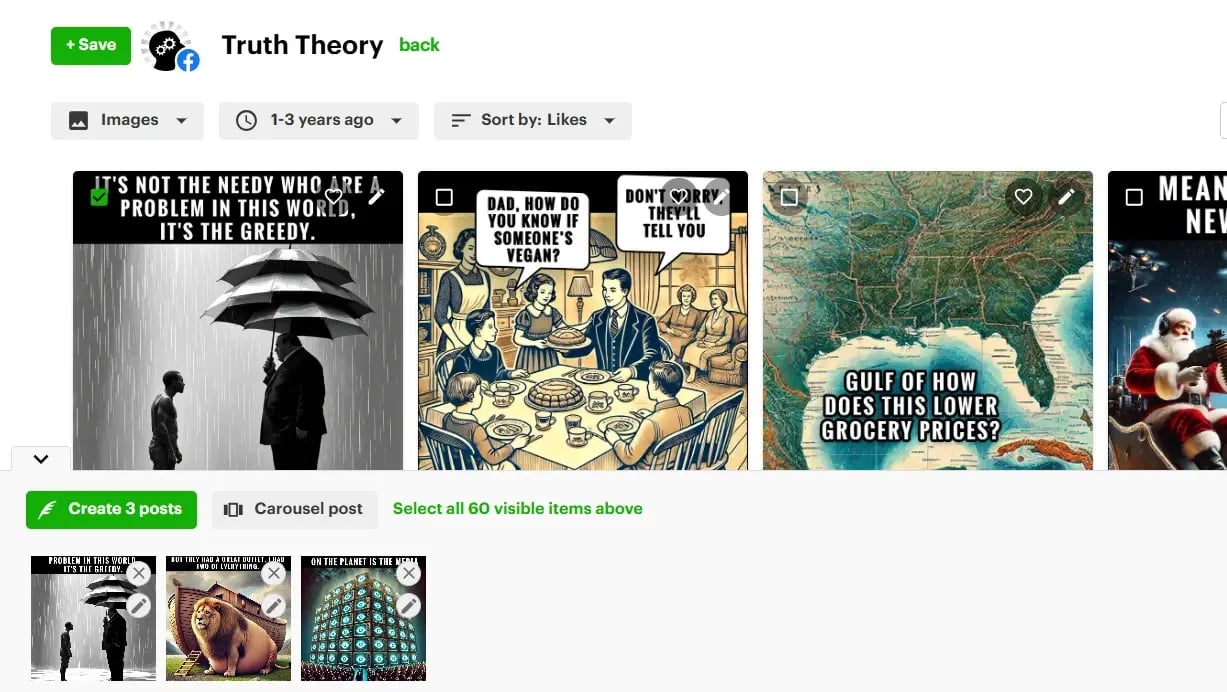
Pick your past winners, click Create post, and send them back into your queue.
4. Click “Create Posts” to turn your selections into new posts.
5. Edit the captions or add a first comment if needed.
6. Add the posts to your queue so they'll publish according to your Posting Plan.
In one of her tutorials, Anji shows how she selects and schedules 6 of her previous posts in just seconds.
That gives those 6 posts another chance to reach new followers.
And at 18 posts a day, recycling winners can save a LOT of time.
ANJI'S TIP: Only use this strategy to repost content from YOUR OWN page. When researching other creators, use their successful posts as inspiration for something original.
PRO TIP: You don’t have to re-add your winners by hand every time. When you create a post in Post Planner, you can turn on recycling so it goes back into your queue automatically after it publishes. You choose how often: a set number of times, until a certain date, or forever. Anji picks her winners by hand because she wants control over what repeats, and recycling is the hands-off version for posts you already know work.
That's the 4-step workflow Anji uses to keep her Facebook page active.
The results: From 3,000 to 374,000 Facebook followers
When Anji started using her new content system, her page took off.
And it happened FAST.
She started with around 3,000 followers in August 2024.
Just 90 days later, she'd reached 100,000 followers.
And she kept growing:
- August 2024: Around 3,000 followers
- 90 days later: 100,000 followers
- 7 months later: 320,000 followers
- Today: 374,000 followers
At one point in 2024, she gained 40,638 followers in just 28 days.
That's a 671% increase, with her posts reaching 18.2 million people during that same period!
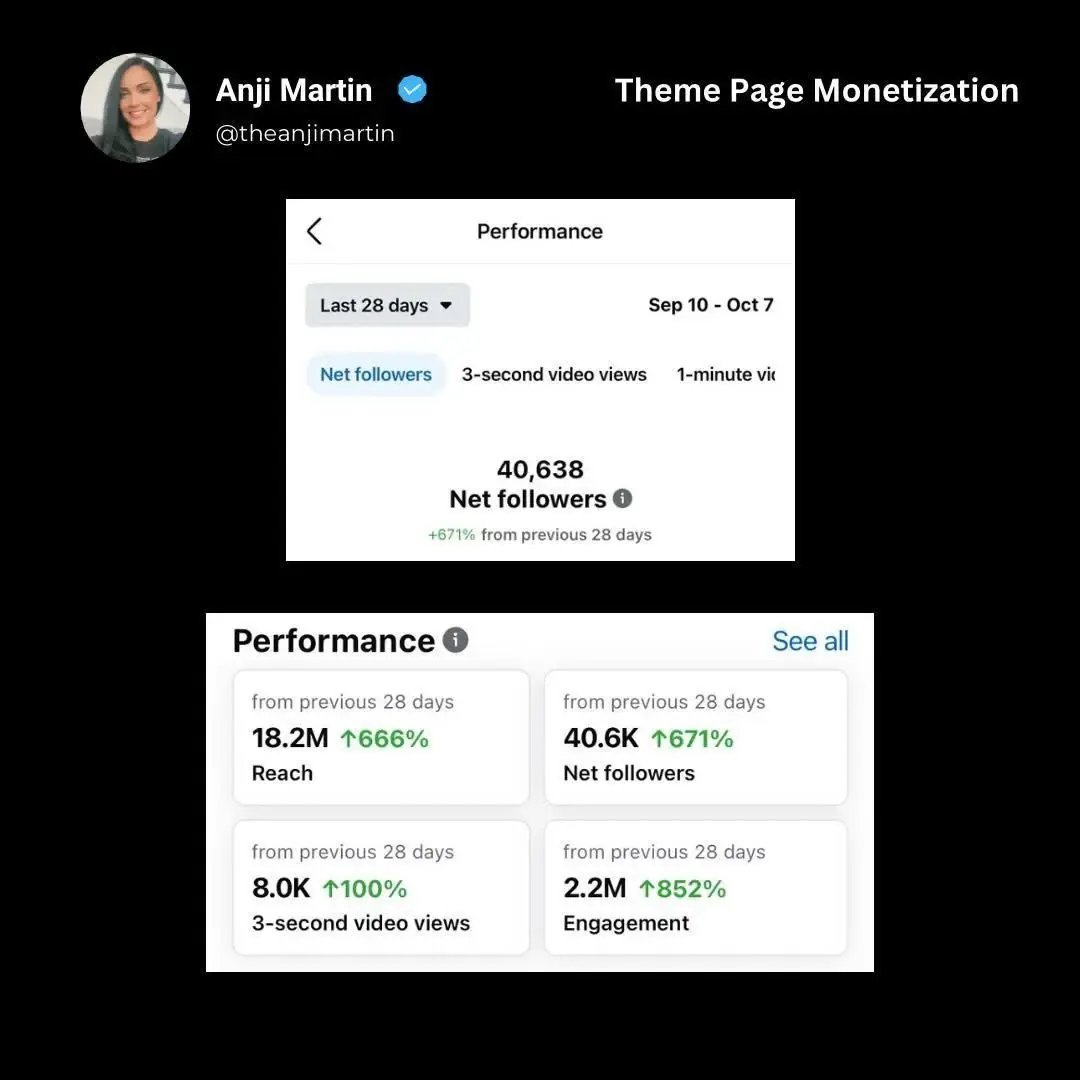
Facebook Insights showing 40,638 new followers, 18.2 million reach, and 2.2 million engagement in 28 days
Her posts also started earning HUGE engagement.
One top-performing Facebook post earned:
- 126,500 Likes
- 8,400 comments
- 11,000 shares
Other posts received 76,000, 35,000, and 25,000 reactions.
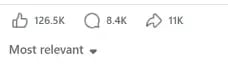
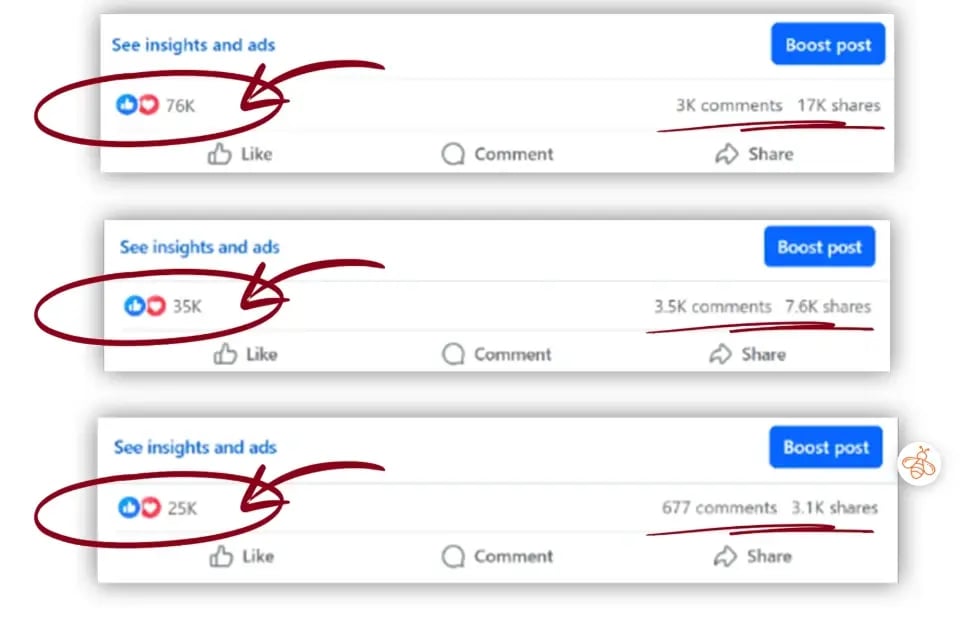
Screenshots of Anji's top-performing Facebook posts
Her posts also reached people outside her existing audience.
For example, one post received 106,028 views, with 100% coming from non-followers.
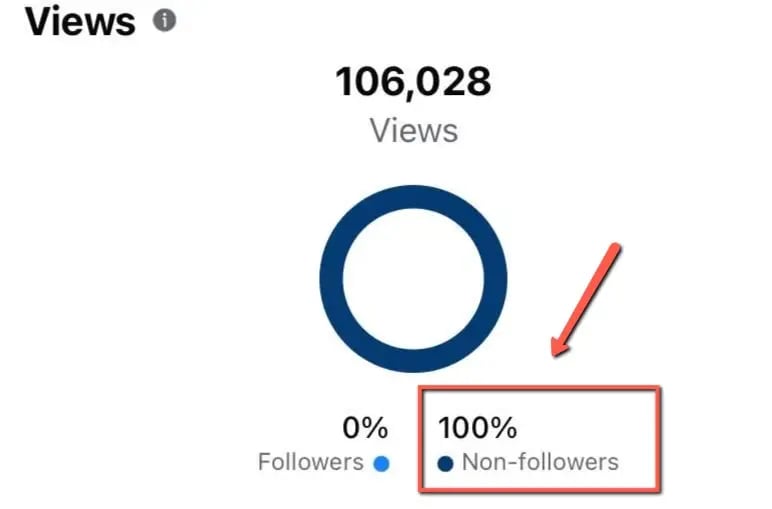
Facebook Insights showing 106,028 views, all from non-followers
And in 1 month, her Facebook page generated more than 49 MILLION views.
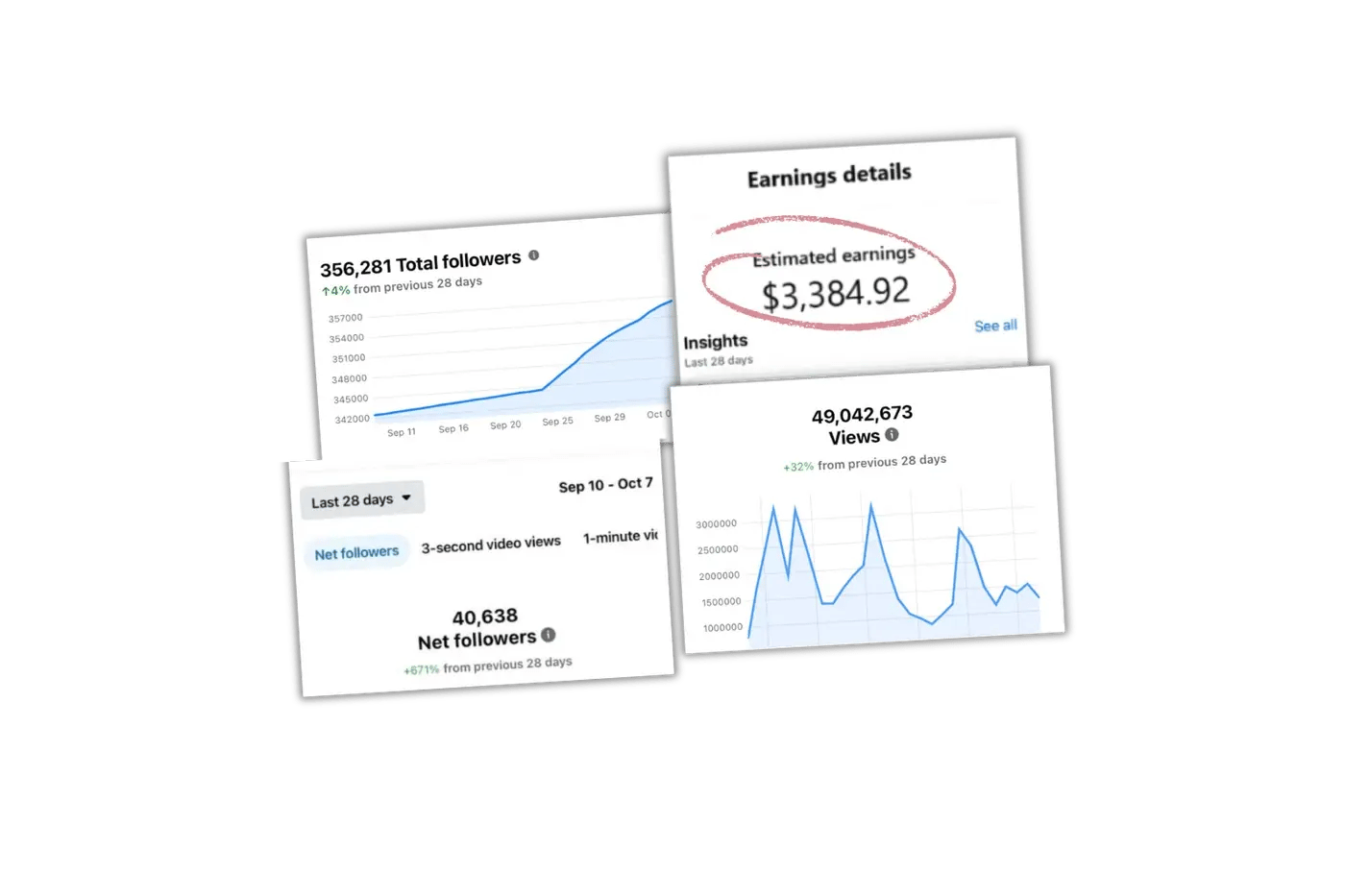
Anji's Facebook dashboard showing followers, estimated earnings, and 49 million views.
And that growth started to pay off.
About 1 month after she started using Post Planner, Anji earned her first $100 in a single day from Facebook.
Just 2 days later, she had a $400 day.
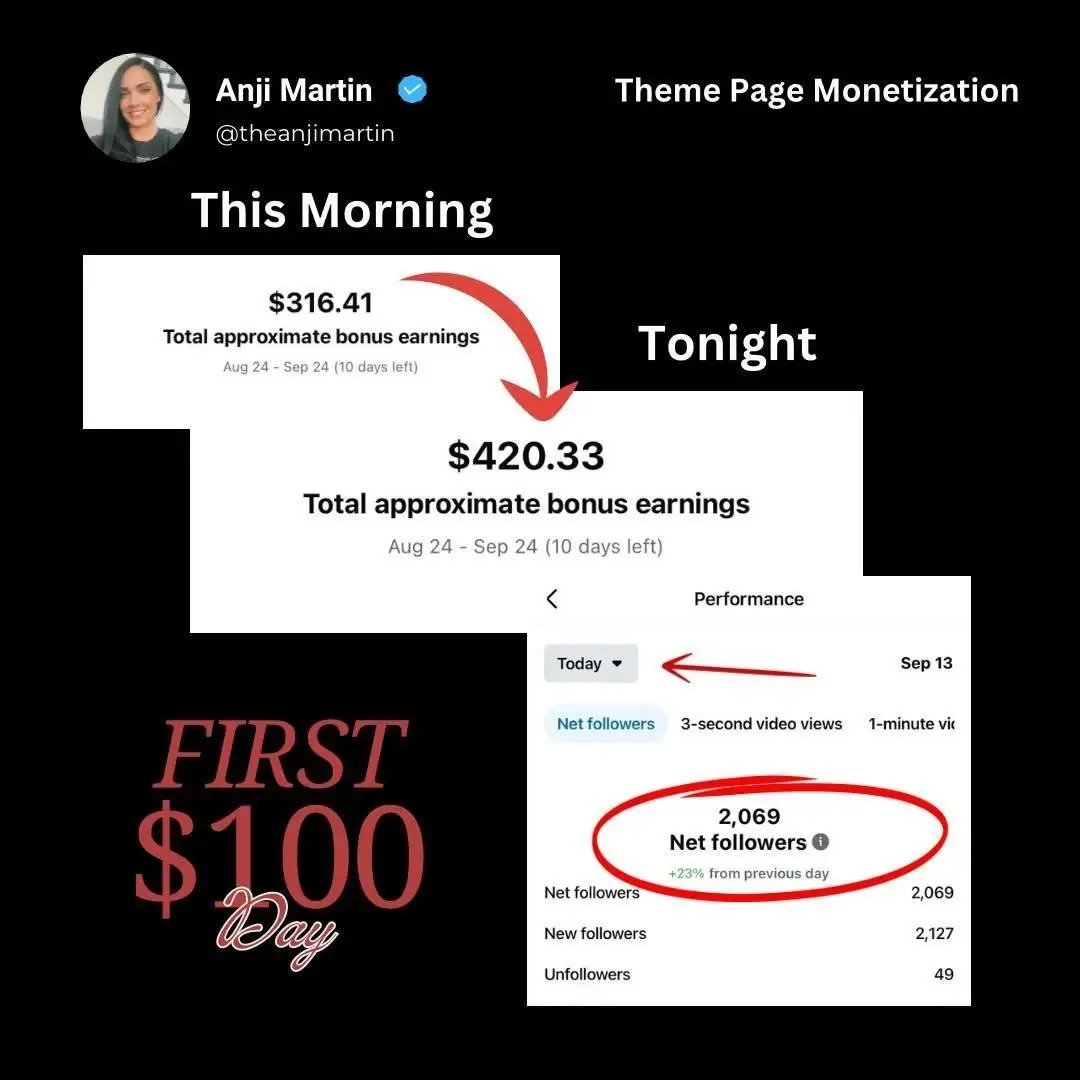
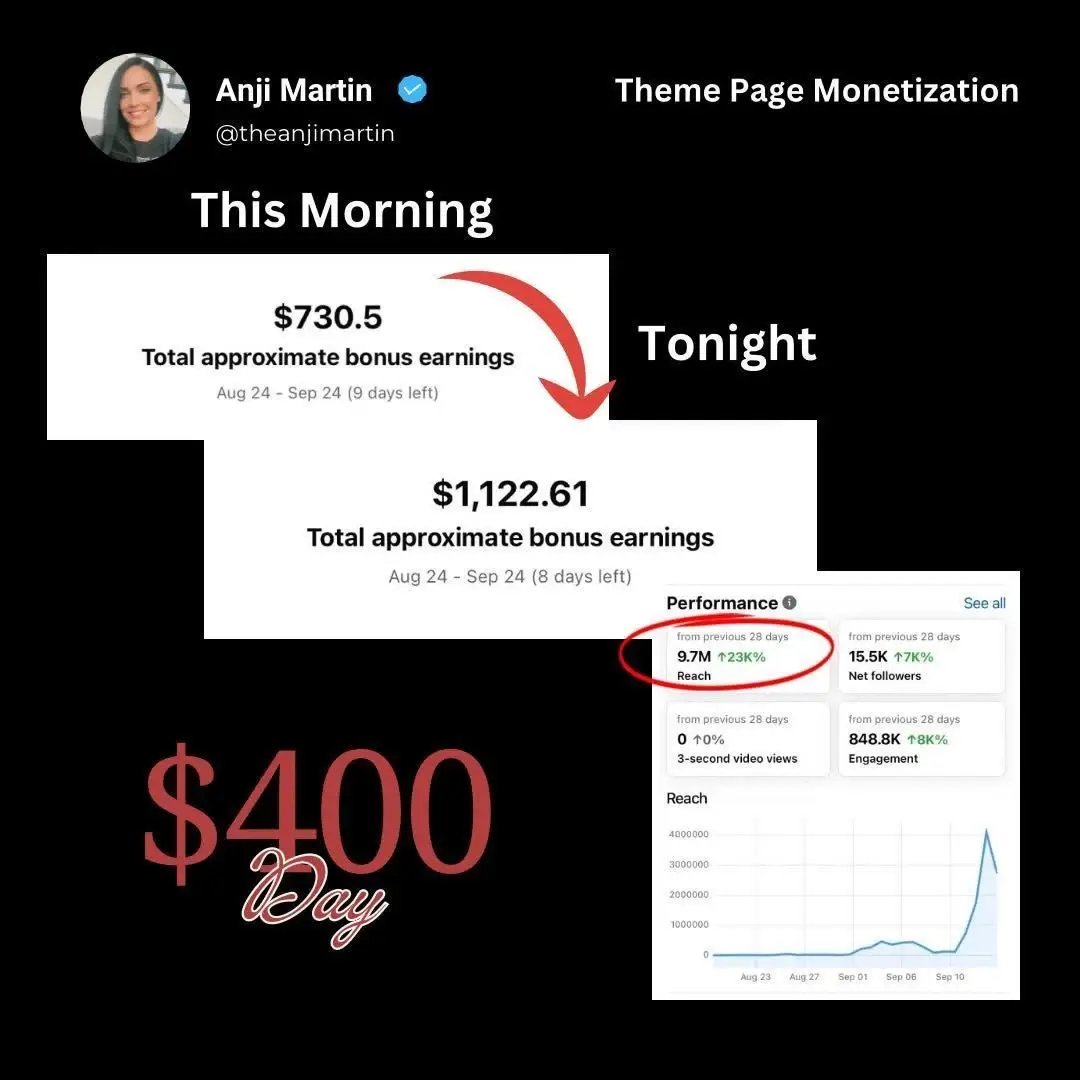
Facebook earnings screenshots showing Anji's first $100 day and $400 day
As Anji says:
“I 100% would not have been able to grow to 374,000 followers in the short amount of time that I did without this tool.”
Anji still did the work of finding good content and learning what her audience wanted.
Post Planner helped her do it without spending every waking hour on Facebook.
But the follower growth was just the start.
From followers to a real Facebook business
The followers opened doors beyond Facebook payouts.
Anji says she averages around $8,000+ a month through Facebook payouts, affiliate marketing, product sales, and other income streams.
And one payout shows how much a single post can earn.
Anji once earned $500 from a SINGLE Facebook meme.
Facebook payouts are only 1 part of how Anji makes money.
She's built 6 income streams around the audience she's grown:
1. Facebook payouts from the content she publishes.
2. Affiliate commissions from recommending products.
3. Digital products she creates and sells.
4. Physical and digital products sold through Etsy.
5. Sales from her own online store.
6. Brand deals and partnerships with companies.
She has numbers to show for it.
For example, in 1 month, she earned $3,384.92 from Facebook content monetization.
In the earnings records she shared, her best month was $8,517.37 across Facebook payouts, product sales, and bonuses.
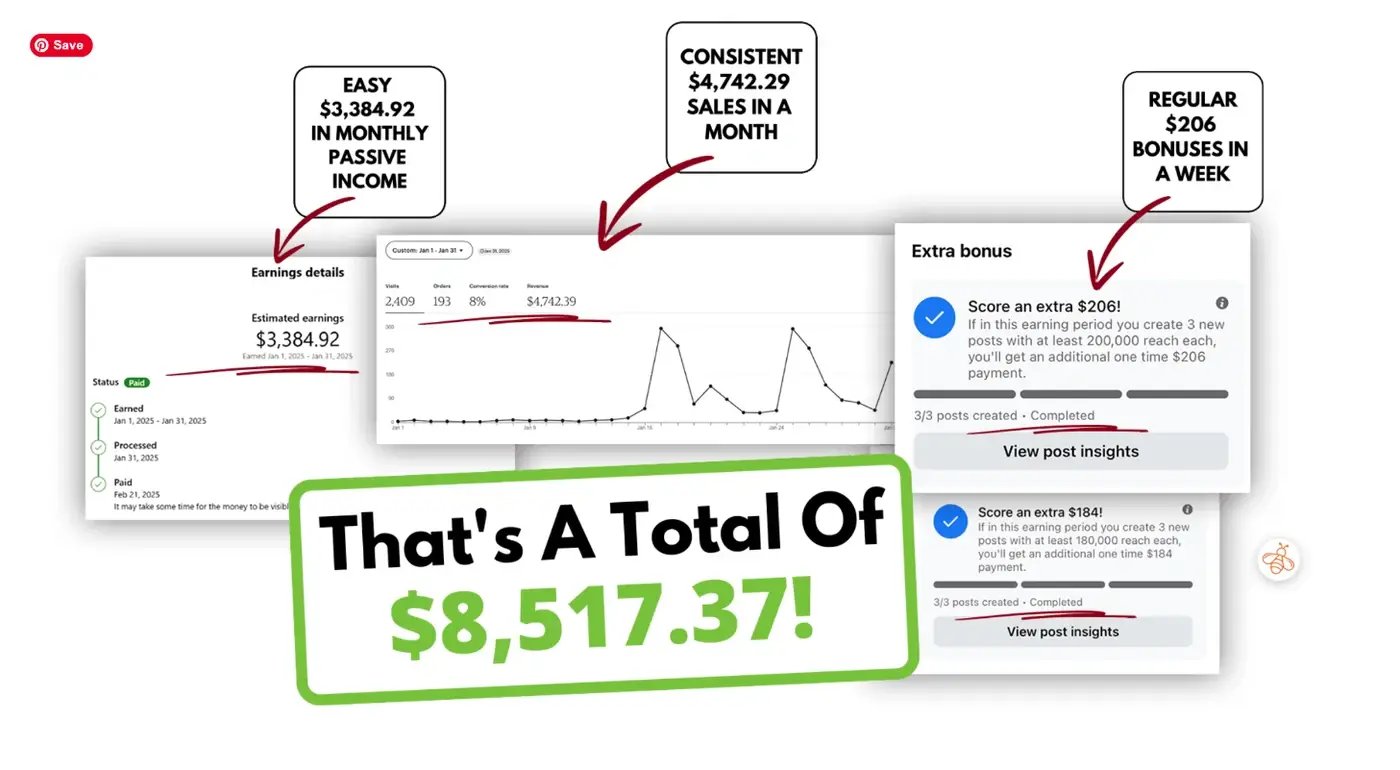
Graphic showing Anji's $8,517.37 month, including Facebook payouts, product sales, and bonuses
Her Etsy shop has also brought in $29,733.99 in sales from 1,137 orders.
And when she launched a new online store, she made over $4,000 in sales in the first 2 weeks!
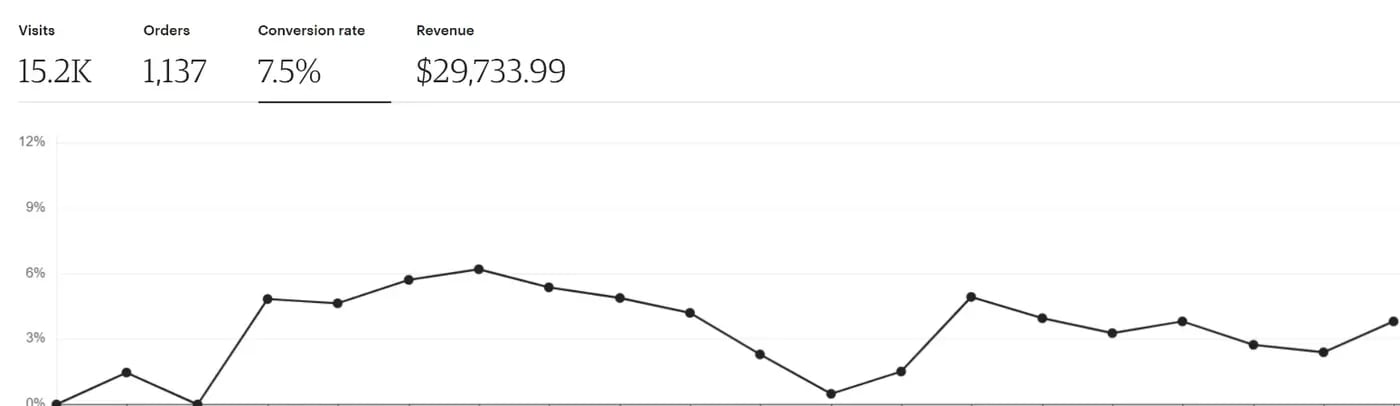
Etsy dashboard showing 1,137 orders and $29,733.99 in sales
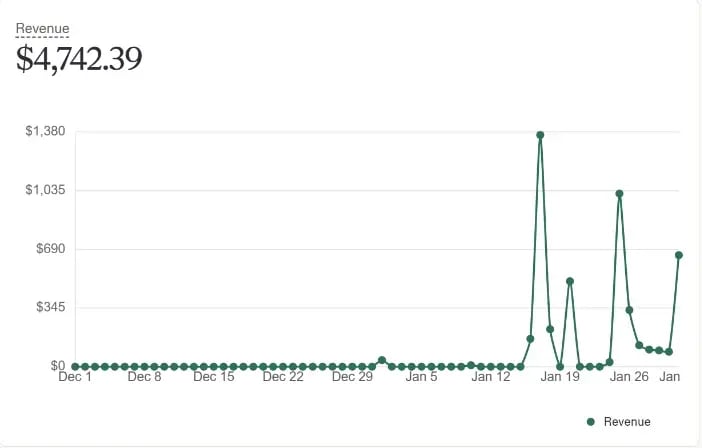
Online store dashboard showing $4,742.39 in sales
One way she earns affiliate commissions connects right back to her posting system.
Remember how Anji adds links to the first comments of her Facebook posts?
Those links can send interested followers to her blog, where she recommends products and earns a commission when someone buys.
She's used this strategy to earn $5,852.64 in affiliate commissions from 504 orders, which generated $23,417.17 in sales for the brands she promotes.
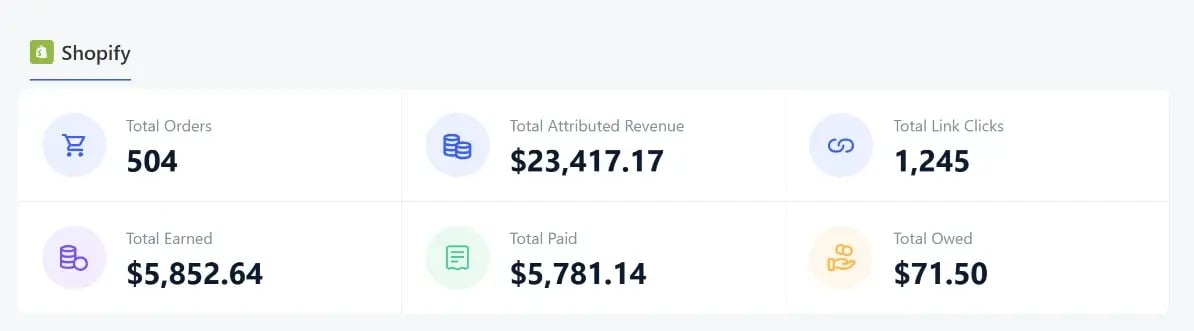
Affiliate dashboard showing 504 orders, $23,417.17 in sales, and $5,852.64 in commissions
She's built ways to earn from her audience beyond Facebook's own payouts.
And as her page has grown, companies have started reaching out to her with brand deals, gifted products, and other opportunities.
“It's not just about the followers. It's about having a solid, legitimate business that pays me in multiple ways.”
And now she's helping other Facebook creators learn how to build something similar.
Now Anji's helping other creators get millions of Facebook views
After growing her own Facebook page, Anji started teaching other creators how to do the same.
Today, she runs a course and live coaching group where she shares the strategies she's learned, including how she uses Post Planner to find viral content and keep her posting schedule full.
And some of her students are seeing AMAZING results.
Take Samantha Bush, for example.
Samantha's page had already been in Facebook's monetization program for years.
After learning how to use Post Planner to research content that's already working, she says her income increased 10x.
“Post Planner has been a pivotal point in my Facebook theme page. My page has been in the monetization program for many years and the research I am able to do with Post Planner has been a game changer. My income has increased 10 fold.”
Her Facebook dashboard shows:
- 7.2 million views in 28 days
- $1,084.71 in estimated earnings
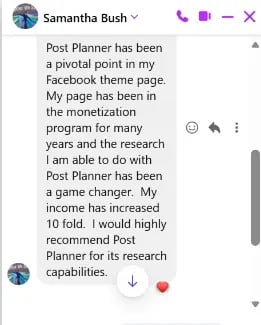
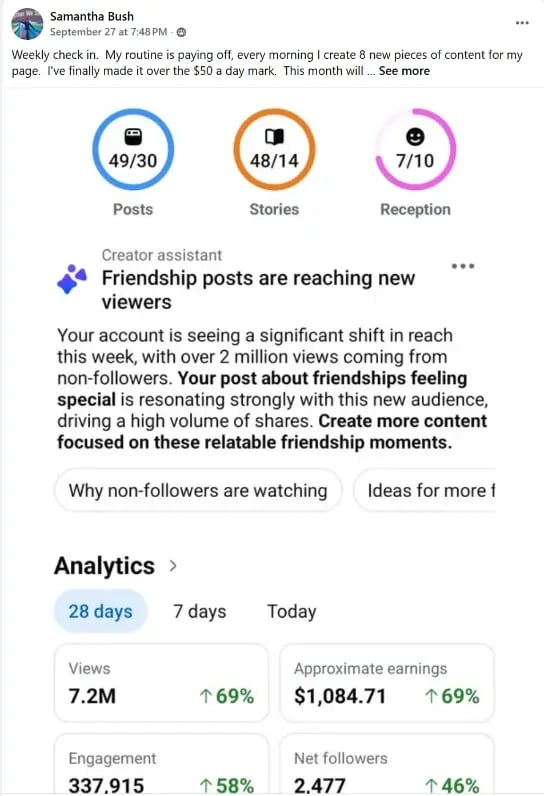
Samantha's message about Post Planner and her Facebook earnings dashboard
Then there's David Erickson.
David grew a brand-new Facebook theme page from 0 to 100,000 followers in just 6 months.
He reached his first 10,000 followers in about 26 days!
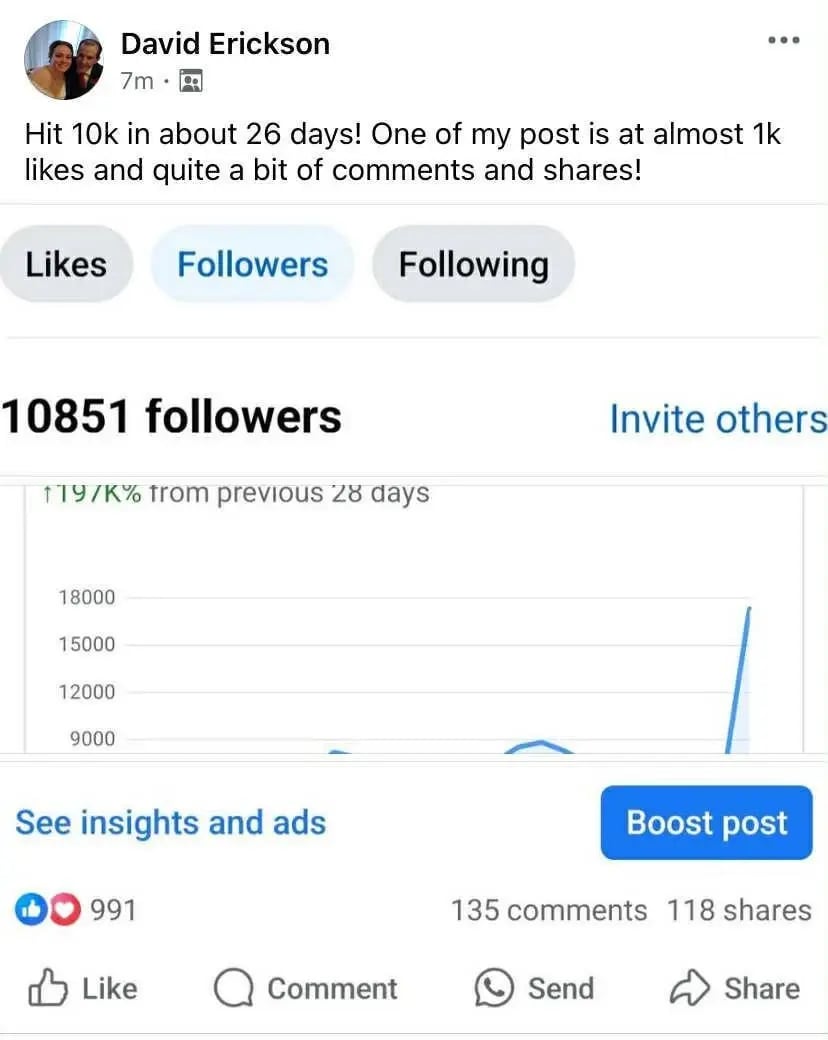
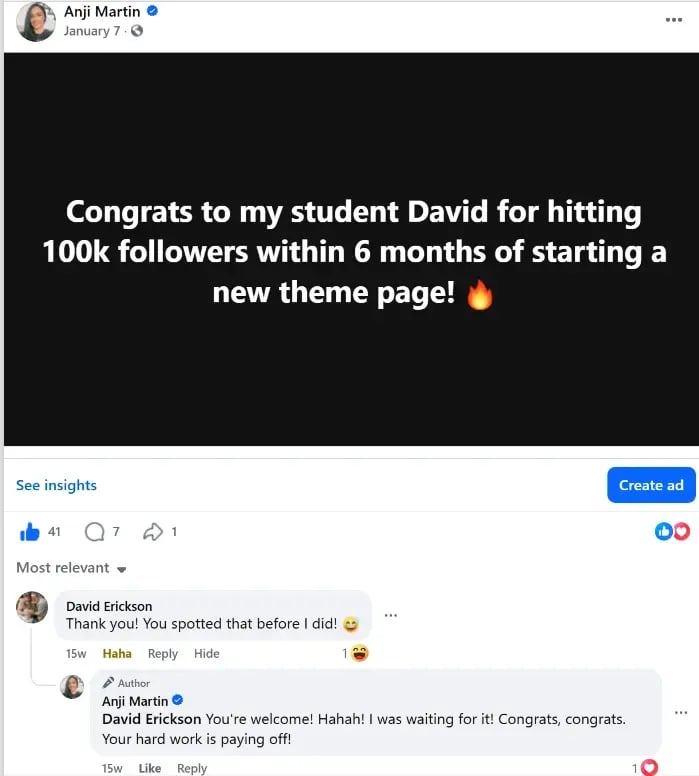
Anji's post celebrating David reaching 100,000 followers and David's earlier 10,851-follower milestone
And Jason Torres had a Facebook post that received 5.3 MILLION views.
That single post earned him $391.40.
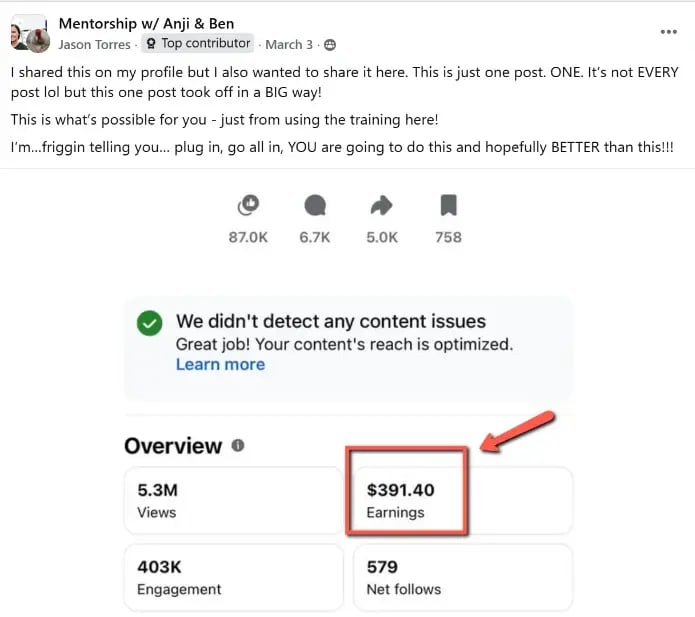
Jason's Facebook post showing 5.3 million views and $391.40 in earnings
Every page is different, and results depend on the content, audience, and consistency.
Still, these student wins show that other creators can learn from Anji's process.
She's also built a community where creators learn to grow their pages and earn from their content.
The 4 lessons Anji wishes every Facebook creator knew
Anji has learned a LOT since she started taking Facebook seriously in 2024.
And after helping other creators grow, she's got advice worth hearing.
“Stop trying to be perfect. Start trying to be consistent. The creators who win aren't always the smartest or the most talented. They're the ones who keep showing up long after everyone else gets distracted or gives up.”
The 4 lessons:
1. Consistency beats perfection. You don't have to create the perfect Facebook post every time. Focus on showing up regularly and learning what your audience responds to.
2. Social media leaves clues. Pay attention to posts that are already getting Likes, comments, and shares. Use those posts as inspiration instead of constantly guessing what to create next.
3. Your old content still has value. Don't forget about posts that performed well months or years ago. Reposting your own best content can help you reach people who missed it the first time.
4. The right tools make your hard work go further. Finding good content and growing an audience still take effort. But tools like Post Planner can help you get more done without spending your entire day on Facebook.
“The right tools don't replace hard work, they multiply it. And for me, Post Planner is that tool.”
Anji put in the work, learned what her audience wanted, and built a system that helped her stay consistent.
Now she's using everything she's learned to help other creators do the same.
Ready to try Anji's Facebook growth strategy?
You've seen how Anji finds ideas, fills her schedule, and gets more from posts she's already made.
Now it’s your turn to try the parts of her system that make sense for your page.
You'll still need to put in the work, but you can try the same Post Planner tools Anji uses.
“It allows you to find the most viral content in your niche within seconds, quickly rework the content for your unique brand and schedule it out in advance. This saves me hours of work per day.”
Ready to try it?
Here's how you can get started with Post Planner:
1. Find viral posts in your niche using the Content Tool.
2. Use AI to turn proven ideas into original content for your audience.
3. Set up your Posting Plan and schedule posts in advance.
4. Find your past winners and add them back to your queue.
You don't need to start by posting 18 times a day.
Start with a few posts, see what your audience responds to, and build from there.
Try Post Planner Free and Start Using Anji's 4-Step System
Thanks to Anji for sharing her story and the system she teaches other creators.
And if you want to learn more from Anji herself, check out her YouTube channel for Facebook growth tips and tutorials, or visit My Socials Pay to learn more about her course and coaching community.







No Comments